1. Abstract
MAI-UI is a universal GUI agent base and supporting code open source by Tongyi-MAI (Tongyi Lab), which is aimed at the automated task of "looking at the screen, understanding instructions, and operating interface". The project emphasizes three types of capabilities required for real-world deployments: active clarification interaction with users (ask_user), invoking external tools (mcp_call) through MCP, and device-cloud collaboration execution architecture (dynamic selection of on-premises/cloud inference under privacy and cost constraints). The official technical report was released simultaneously, and the MAI-UI-2B and MAI-UI-8B weights were open-sourced, making it easier for developers to access the OpenAI-Compatible API in the form of Tell Zhishi.
2. Core features
- GUI Grounding: Maps natural language instructions to the coordinates of the screen target control, which is used for the base ability of "where to click/find which button".
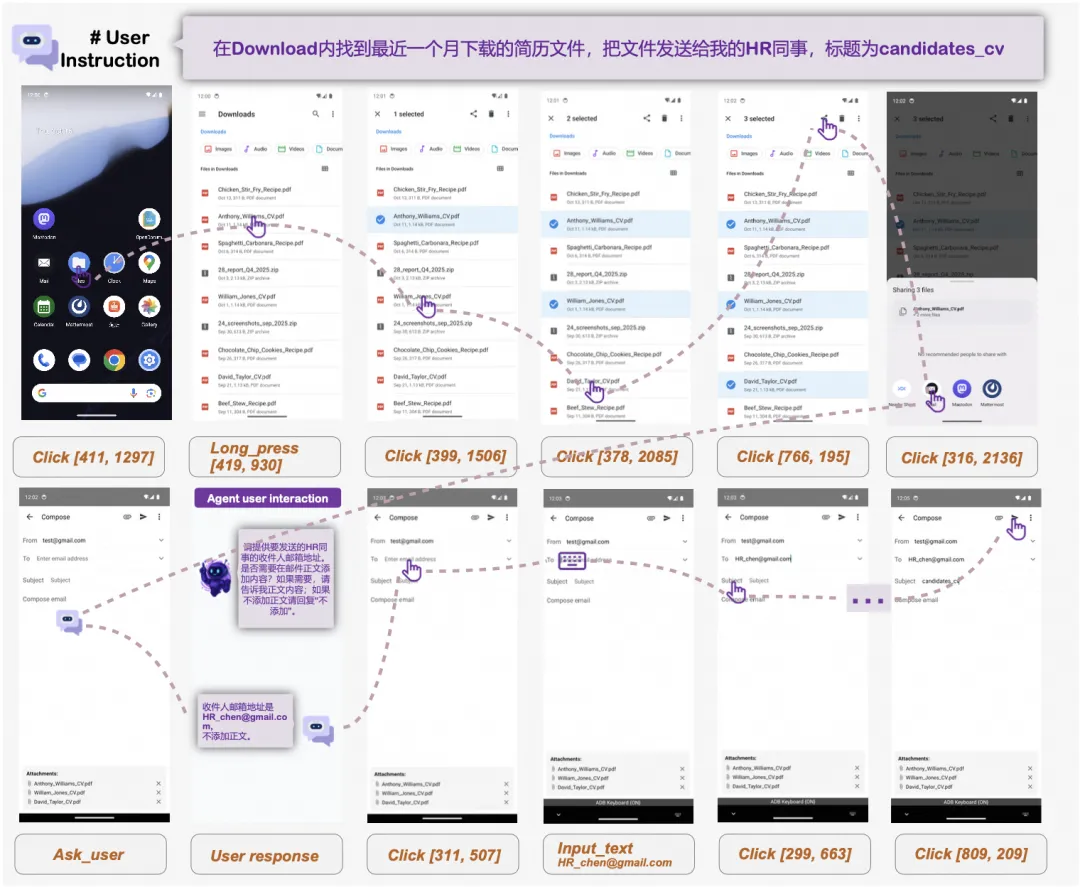
- Mobile GUI navigation: supports click, long_press, type, swipe, drag, system_button, wait, terminate, answer and other action spaces, covering multi-step task execution.
- Native user interaction: When the command lacks information or there is ambiguity, the agent can actively ask questions to complete key constraints (such as object, time, account, confirmation permission).
- MCP tool enhancements: In addition to "pure UI operations", introduce tools/API capabilities to reduce step length and vulnerability (such as map, search, system capabilities, etc.).
- Device-cloud collaboration and privacy: Route execution between local and cloud through task status and sensitive information judgment, taking into account performance, cost, and privacy risks.
3. Installation
1. Clone code: git clone https://github.com/Tongyi-MAI/MAI-UI.git && cd MAI-UI
2. Start the model service (vLLM recommended): Install vllm>=0.11.0 and transformers>=4.57.0, and use OpenAI-Compatible API to start the service (see the repository README for an example).
3. Installation project dependencies: pip install -r requirements.txt
4. Run the notebook: Go to the cookbook/ and use grounding.ipynb (positioning example) and run_agent.ipynb (navigation agent example) to point llm_base_url to your vLLM service address.
4. Typical use cases
- Cross-app transaction automation: such as "ticket checking-grouping-changing schedule-@同事确认" and other long-link, multi-application collaborative tasks.
- Mobile assistant: Perform multi-step processes such as "setting, searching, filling, and submitting" in the Android environment.
- Product and operation quality inspection: automatic regression and operability detection of the key path of the app (button reachability, whether the path is broken).
- Tool-enhanced tasks: UI and tools are mixed (such as navigation/POI/schedule, etc.) to reduce the cumulative error caused by pure clicking.
- Device-side priority scenario: Weak network/high privacy tasks are executed locally first, and then switch to the cloud to handle complex steps if necessary.
5. Ecology and competing products
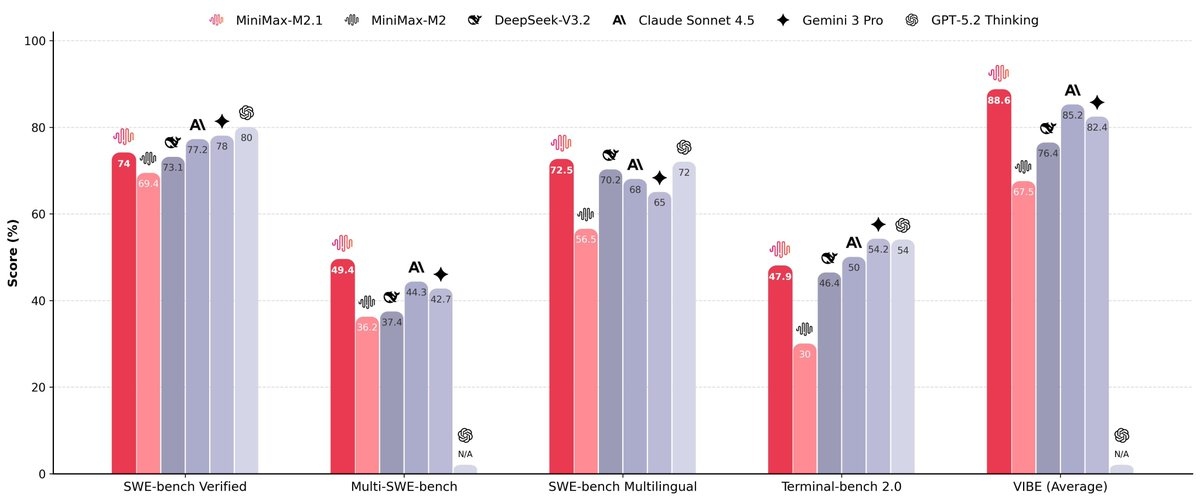
- Ecological benchmarks: MAI-UI evaluations and discussions are often associated with benchmarks such as ScreenSpot-Pro, OSWorld, and AndroidWorld. The team also open-sourced MobileWorld, which is more real-world (with cross-app, user interaction, and MCP enhancement tasks).
- Adjacent directions: UI-TARS, UI-Ins, GUI-Actor, OS-Atlas, etc. also focus on GUI positioning and operation, but the integration methods in the landing elements such as "interaction clarification, tool calling, and device-cloud collaboration" are different. Selection recommendations are based on your environment (mobile/desktop/web), available tools, privacy compliance, and cost budget.
6. Limitations and precautions
- SOTA/indicator source: Public grades usually come from the evaluation and configuration set by the paper/report, and still need to be verified when migrating to your app/process.
- Accumulation of long link errors: The longer the number of UI task steps, the more fragile it is, so it is recommended to give priority to tool calling, constraint clarification, and "key step confirmation".
- Environment dependence: Different resolutions, themes, languages, animations, and pop-ups will significantly affect the positioning and execution stability.
- Permissions and compliance: Operations involving accounts, payments, and privacy data should be explicitly authorized and audit logs to avoid automated overreach.
- Computing power and latency: 2B/8B is more suitable for development and edge inference; Larger formats, such as the larger models mentioned in the report, often require more computing power and more complex deployments.
7. Project address
https://github.com/Tongyi-MAI/MAI-UI
8. Frequently asked questions
Q: How to choose between MAI-UI-2B and MAI-UI-8B?
A: 2B is more lightweight and fast verification; 8B is usually more stable in complex instruction understanding and multi-step tasks, and is actually based on your device and task success rate test.
Q: How does MAI-UI use vLLM to deploy as an OpenAI-Compatible interface?
A: Press the repository README to launch the vllm.entrypoints.openai.api_server, set the --model, --served-model-name, port, and parallel parameters, and then point llm_base_url to the address in the notebook/app.
Q: Does MAI-UI support MCP Tool Calls (mcp_call)?
A: The project uses MCP as part of the expansion action; You need to deploy/configure MCP Server on your own stack and enable the corresponding capabilities when the agent is running.
Q: Why does MAI-UI need ask_user (proactive question clarification)?
A: Real instructions often lack key constraints (object, scope, confirmation steps), and active clarification can reduce misoperations and improve task completion rates.
Q: Can MAI-UI be used offline and run on the end-side?
A: Inference services can be started locally and run offline, but the device-side capability is affected by model size, device computing power and task complexity. When sensitive information is involved, it is recommended to prioritize the execution on the end side and join permission control.