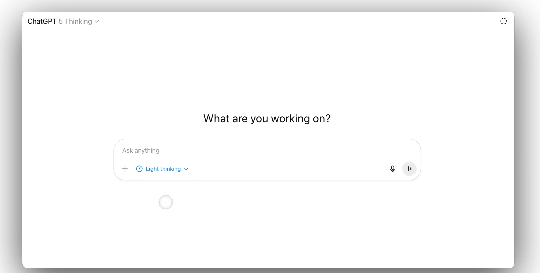
OpenAI has added an adjustable thinking time switch for GPT-5 Thinking: After selecting GPT-5 (Thinking) on the ChatGPT web app, you can switch the thinking time directly in the message input area. Plus and Business offer Standard and Extended; Pro additionally offers Light and Heavy. Your selection will remain in effect in web-based conversations until manually changed.
1. What This Change Addresses
1. Optional Balance between Speed and Intelligence
GPT-5 Thinking now has two new settings: Standard (default, balancing speed and intelligence) and Extended (deeper reasoning). This allows for optimal performance in both daily question-answering and long-term reasoning, reducing the dilemma of being "too slow or too shallow."
2. Pro's four-speed fine control
Pro users have two additional speeds: Light (fastest) and Heavy (deeper), which are suitable for GPT-5 Thinking usage scenarios of different intensities, such as code review, strategy planning, and research writing.
(1) Typical combinations
Light Q&A/drafting: Light or Standard.
Analysis/multi-step planning: Standard or Heavy.
Complex research/long evidence chains: Extended or Heavy.
(2) Key points of the experience
Thinking longer is not necessarily better; GPT-5 can maintain high-quality output with shorter thinking, and it is more cost-effective to switch to a deeper speed when encountering ambiguous tasks.
(3) Persistence settings
In web-based conversations, the gear selection of GPT-5 Thinking will be retained, reducing the cost of repeated switching.
II. Team implementation and cost management
1. Standardized usage
Provide a mapping table of "task→thinking gear" in the team specifications, and put the choice of GPT-5 Thinking in the process to avoid arbitrarily extending the thinking time.
2. Grayscale and observation
Compare the accuracy, rework rate and latency of Standard and Extended in key scenarios, and promote the use of heavy gear after confirming the benefits.
3. Engineering collaboration
(1) Prompt word template
Provide different structured questions for different gears.
(2) Failure fallback
Start with Standard, and switch to Heavy/Extended with one click when necessary.
(3) Billing and monitoring
Include "average time × number of retries × number of words" in the dashboard.
a. Communication Standards
Specify the "expected gear and time limit" in the requirement description.
b. Data Protection
Even if you choose Heavy for sensitive tasks, adhere to the principle of data minimization.
c. Quality Review
Build a library of counterexamples for "when extended thinking time should not be used" to reduce abuse.
Frequently Asked Questions (Q&A)
Q: How do I switch the thinking time in GPT-5 Thinking?
A: Select GPT-5 (Thinking) on the ChatGPT web app. In the message input area, select Light/Standard/Extended/Heavy (depending on your plan) in the Thinking Time switch.
Q: What is the difference between Plus, Pro, and Business gears?
A: Plus and Business offer Standard and Extended; Pro also offers Light and Heavy, covering the full range from extreme speed to deeper reasoning.
Q: Is choosing Extended or Heavy always better?
A: Not necessarily. We recommend starting with Standard to get a baseline, then switching to Extended/Heavy only when stronger reasoning and search integration are needed to control cost and latency.
Q: Will the settings reset every time?
A: No. On the web, the thinking time you choose for GPT-5 Thinking remains in effect until you manually change it.