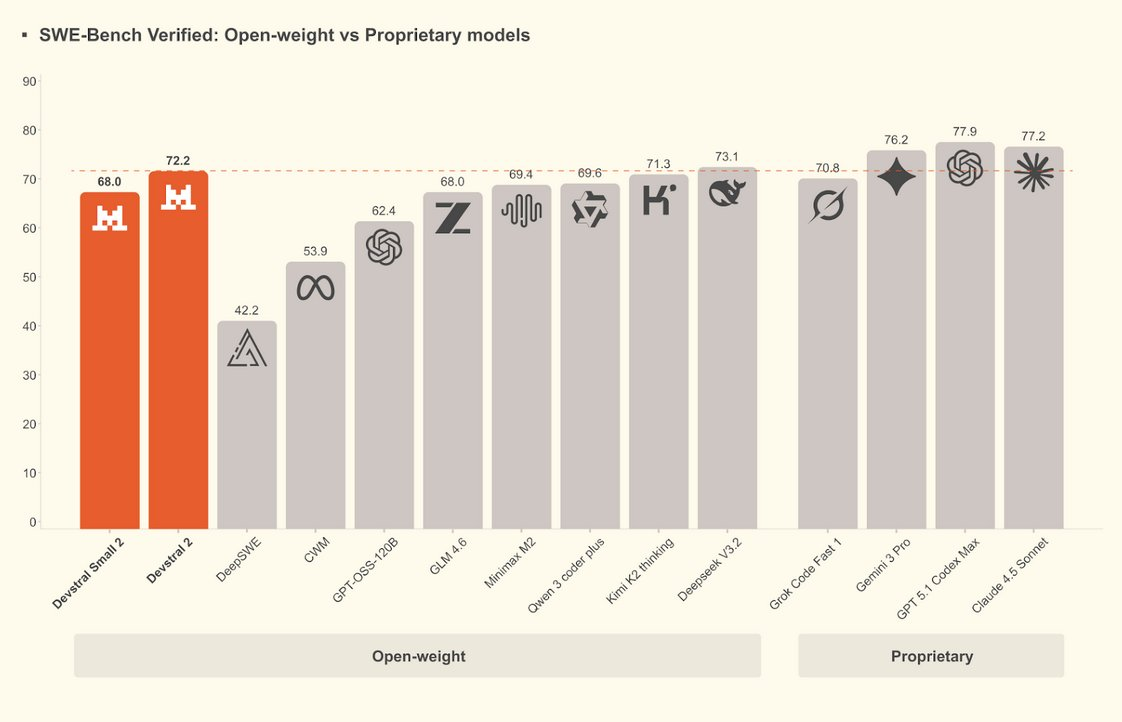
Mistral AI, a French artificial intelligence company, announced the launch of Devstral 2, a new generation of coding model family, and simultaneously released Mistral Vibe, a raw life command tool. Devstral 2 offers two open-source versions: Devstral Small 2, which is more suitable for high-computing power scenarios, and Devstral Small 2, which is more suitable for on-premises deployment, targeting software engineering and code agent tasks, emphasizing multi-file understanding and automated modification capabilities in real projects.
According to official information, Devstral 2 supports ultra-long contexts, allowing cross-file browsing, refactoring, patching, and committing candidate changes in large codebases, and is at the forefront of open-source models in multiple code benchmarks. Both models are released under open licenses, with the main model under a modified MIT license and the small model under an Apache 2.0 license, both of which can be run locally through interface calls or download weights provided by Mistral.
Mistral Vibe, which debuted alongside the model, is a terminal-oriented command-line AI assistant that reads code repositories locally, performs project-level understanding, generation, and editing operations, and runs tests or scripts on commands, supporting macOS, Linux, and Windows. Because the tool has the ability to execute commands and modify files, development teams still need to do version control and backup before use, and review automated changes to reduce code changes and security risks.
FAQs
Q: What is Devstral 2?
A: Devstral 2 is a next-generation coding model family launched by Mistral AI, focusing on software engineering scenarios such as code understanding, generation, and multi-file automated modification.
Q: What is the difference between Devstral 2 and Devstral Small 2?
A: The former has larger parameters and is suitable for cloud or high-performance computing power environments. The latter is smaller and easier to deploy on local GPUs or high-end PCs, and they use different open source licenses.
Q: What does Mistral Vibe do?
A: Mistral Vibe is an original life command tool that can understand project structure, generate or edit code, and execute tests and scripts in the terminal based on Devstral 2, enabling end-to-end automation of the development process.
Q: Are these tools free and how can I get them?
A: The Devstral 2 series is currently available through the interface provided by Mistral, and the model weights can be downloaded, and Mistral Vibe can be obtained through the installation script or package manager, and the specific fees and usage policies are subject to the official announcement.
Q: What should I pay attention to when using Devstral 2 and Vibe?
A: Before authorizing Vibe to access the code repository and execute commands, it is recommended to enable version management, make backups, and manually review the generated changes to avoid accidentally deleting important files or introducing security risks.