1. Abstract
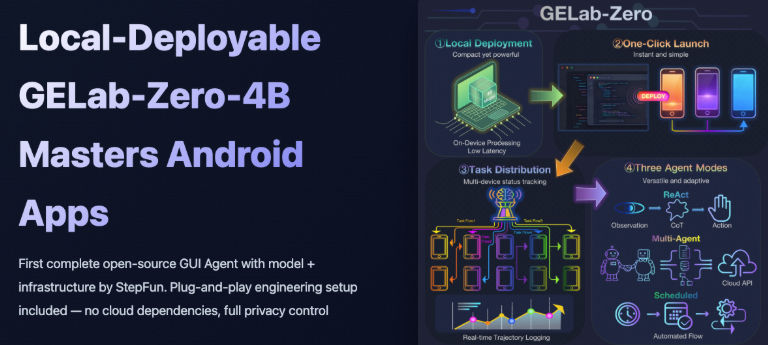
GELab-Zero is an open-source GUI agent solution from StepFun, providing a complete stack of "model + engineering infrastructure", mainly for automated operations and intelligent interaction of Android mobile applications. The project includes a 4B GUI Agent model that can run locally, as well as one-click deployment of inference and device management scripts, supporting multi-phone task distribution and track recording, and achieving high success rates on benchmarks such as AndroidWorld and AndroidDaily, which is suitable for researchers and enterprises to conduct mobile agent experiments and prototype verification.
2. Core features
- Complete Model+Infra: At the same time, open source inference services, agent runtime, and visualization tools reduce the threshold for engineering access.
- Local 4B model: GELab-Zero-4B-preview supports running on consumer-grade GPUs/high-end CPUs, taking into account latency and privacy.
- Multi-device and task distribution: Support multiple Android devices to execute tasks in parallel, automatically record interaction tracks, and facilitate reproduction and debugging.
- Multiple Agent Modes: Built-in modes such as ReAct loops, multi-agent collaboration, and scheduled tasks, covering complex processes such as recommendation, query, and ordering.
- Public benchmarks and data: Provide AndroidDaily real-life scenario data, and perform ahead or close to SOTA in multiple GUI benchmarks.
3. Installation
1. Prepare the environment: It is recommended to use Python 3.12+, and it is officially recommended to create a gelab-zero virtual environment through Miniforge.
- Clone repository and dependencies:
git clone https://github.com/stepfun-ai/gelab-zero.git
cd gelab-zero
pip install -r requirements.txt
- Deploy LLM:
- Individual users: Install Ollama, download the
GELab-Zero-4B-previewfrom Hugging Face, performollama create gelab-zero-4b-preview -f Modelfileto complete the import, and use Q4/Q8 quantization as needed. - Advanced users: You can use vLLM to deploy long-term stability services on a per-document basis.
- 4. Configure Android devices: Install ADB, turn on mobile developer mode and USB debugging, and
adb devicesconfirm that the device is online. - 5. One-click startup: Run the officially provided startup script in the warehouse, connect the model service and the device, and enter the GUI Agent end-to-end inference.
4. Typical use cases
- Life service automation: complete operations such as taxi hailing, ordering, ticket purchase, and welfare collection in apps such as takeaway, travel, social networking, and payment.
- Content and information retrieval: Search for content by conditions in Zhihu and News App and open the specified answer or page.
- Complex shopping process: Filter products, add to favorites or place orders on e-commerce platforms according to amount, specifications, etc.
- Benchmark research: Evaluate different GUI Agent policies and model versions on AndroidDaily static/end-to-end tasks.
5. Ecology and Competing Products
- Ecological Components:
- Hugging Face/ModelScope provides official weights;
- The community provides GGUF quantization (convenient for llama.cpp and local desktop clients);
- Supporting the AndroidDaily dataset and the open source benchmark web page.
- Comparison of competing products: Compared with GUI models such as UI-TARS AND GUI-Owl, GELab-Zero is characterized by a complete engineering stack, optimization for real Android scenarios, and cost-effectiveness at 4B scale; The specific effect still needs to be verified in combination with its own hardware and tasks.
6. Limitations and precautions
- Only for Android GUI scenarios, iOS and Web applications need to be adapted or other solutions are required.
- Although the 4B model is relatively lightweight, it still requires good computing power and heat dissipation conditions for long-term multi-device inference.
- Automated operations involve sensitive information such as accounts and payments, so it is recommended to run them in a test account or controlled environment, and do a good job of permission isolation and log management.
- The project is still in the rapid update stage, and the interface and script may change, so you should read the latest documentation and change records before upgrading.
7. Project address
https://github.com/stepfun-ai/gelab-zero 8. FAQs
Q: Does GELab-Zero support fully on-premises deployment and offline operation?
A: Yes. Model inference and device control can be completed locally without relying on cloud services, but sufficient computing power and storage space are required locally.
Q: What are the general hardware requirements for GELab-Zero-4B-preview?
A: It is generally recommended to use a single-card GPU or high-end CPU with 8–12GB of VRAM, which can be experienced on lower-end devices with high-compression quantization (such as Q4), but the inference quality and speed will be reduced.
Q: I already have my own multimodal/language model, can I directly connect to GELab-Zero?
A: Yes. The default GELab-Zero-4B-preview can be replaced as long as the conversational inference service is available via HTTP or similar interfaces and follows the request and message formats agreed upon in the project documentation.
Q: Can the AndroidDaily benchmark be used separately for model evaluation?
A: Yes. The repository and official website provide two evaluation methods, static and end-to-end, and can independently download data and scripts to conduct comparative experiments on their own GUI agent models.