1. Basic Information
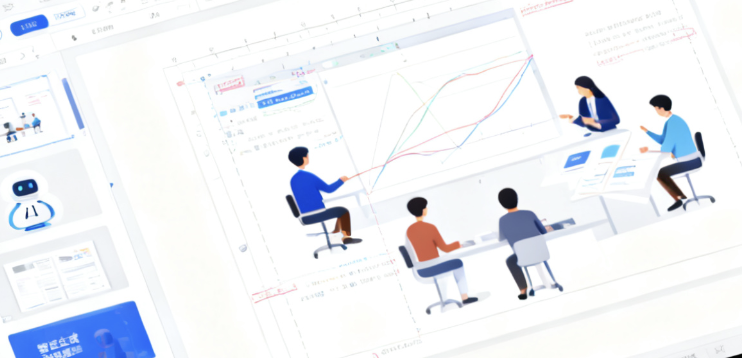
Meeting PPT (huiPPT) is a one-click PPT generation online service platform based on artificial intelligence technology, focusing on providing the ability to "AI automatically generate and optimize PPT outlines and content". The product is aimed at users who frequently produce reports, courseware, and presentation documents, and can quickly generate presentations with complete structure and content formation by inputting topics or materials, reducing the time of building and repeatedly typesetting from scratch.
From the perspective of positioning, PPT belongs to the category of online AI office tools and AI PPT generation tools, emphasizing the generation of PPT files that can be directly used or lightly modified in a short period of time, covering a variety of usage scenarios such as workplace displays, educational courseware, business roadshows, and project reports.
2. The core concept of PPT at the product overview
meeting is to "use AI to complete most of the first draft of PPT for users". Users only need to give the presentation topic, link address or existing document content, and the system can automatically generate the presentation outline, page structure and corresponding text content, and combine the preset templates to complete the basic layout and visual style, so that users can focus on content proofreading and personalized modification.
As an online service platform, PPT provides a user portal through the web page, eliminating the need to install complex software locally. The generated results are output in the form of standard PPT files, which can be edited in local office software, or directly used for conference presentations, classroom teaching, or customer reports.
3. Core functions
1. The main function
of PPT supports a variety of one-click generation methods, including generating PPT according to the topic, generating PPT through links, generating PPT based on document content, etc. The system will develop a logical and clear outline framework, and then fill in the text content of each page, so that the whole set of presentations is more in line with common presentation and explanation habits.
In terms of content quality, PPT detects and verifies the generated text through AI models, striving to ensure that the information is complete and the expression is coherent, and reducing the workload of users who rewrite it significantly. Once users have the PPT source file, they can freely adjust the text, typography, and color matching, striking a balance between efficiency and controllability.
In terms of visual performance, PPT provides a wealth of templates and layout styles, which are suitable for business presentations, corporate topics, government and enterprise reports, education and training and other scenarios. Users can choose from different style templates to quickly present the same content with a more appropriate visual effect.
2. Technical characteristics
The PPT will comprehensively use the self-developed local model and cloud model to form a technical architecture of "local and cloud symbiosis". Through the combination optimization of algorithms and models, the system can complete the outline ideation, content generation and layout suggestions in a short time, taking into account the generation speed and content quality.
In terms of service capabilities, the PPT focuses on optimizing Chinese scenarios and is more suitable for local workplace expression, teaching content and business communication habits. The platform is continuously iterating on algorithms and model versions to improve the professionalism and readability of the generated materials, and enhance the ability to adapt to different topics and industry materials.
4. Pricing and version
of PPT adopts the usage mode of online services, and users can usually get a certain number of free experiences after registering and logging in, which is used to test the effect and operation process of one-click PPT generation. After the free trial ends, if you need to continue using the full features, you generally need to activate paid services or purchase corresponding packages according to the platform's current policy.
Specific charging standards, free times, event discounts, and corporate cooperation plans may change over time or with adjustments in operational strategies. There may also be differences in the combination of functions opened at different stages, and the actual price description on the PPT official page and platform shall prevail.
5. Applicable scenarios and groups
In the workplace, PPT is suitable for white-collar workers who need to frequently produce weekly reports, monthly summaries, project reports, business proposals and roadshow materials, helping to quickly generate basic versions of documents and relieve the pressure of "temporary PPT" at emergency time nodes.
In the field of education and training, PPT can be used by teachers to produce course courseware, training lecturers to build syllabi, and institutions to prepare open classes and presentation materials, so that knowledge content can be transformed into structured teaching presentation documents faster.
In the sales and customer communication scenario, PPT can assist in the production of product introductions, solution descriptions, event presentations, and basic drafts of bidding plans, providing high-frequency and reusable presentation templates and content frameworks for sales teams and business teams.
In addition, for students and individual creators who need to complete graduation defenses, classroom presentations, or competition presentations, PPT can also provide efficiency tool roles to help build a standardized presentation structure in a short period of time, and then make personalized polishing and design adjustments.
6. FAQsQ
: What ways does huiPPT support one-click PPT generation?
A: PPT supports various methods such as generating PPT based on topic, PPT through links, and PPT based on document content. Users can input a presentation topic and let the system automatically build an outline and page structure; You can also provide web links or existing documents, and the system will extract key points and generate corresponding PPT page content.
Q: Can the PPT generated by the PPT be edited and modified twice?
A: Yes. The PPT output is a standard PPT source file, and users can freely edit and adjust the text, pictures, layout and color scheme in common office software. The platform emphasizes that the generated content can be used directly, while also retaining sufficient space for secondary creation.
Q: Do I need to have a design foundation to generate a presentation using PPT?
A: No, you don't. The basic design work is completed through preset templates and layout styles, and users mainly pay attention to modifying the content itself. Even if you lack design experience, you can rely on templates to quickly get a presentation with a clear structure and standardized layout.
Q: Who is PPT suitable for long-term use?
A: The PPT is especially suitable for professionals, teachers, training lecturers, sales and business personnel, and students who need to prepare courseware or defense documents who often need to make presentations. For users who want to complete a large number of PPT drafts in a short period of time, emphasize efficiency and batch output, PPT has high practical value.
Q: Is PPT completely free, what should I pay attention to before using it?
A: PPT usually provides a certain number of free experiences to understand the generation effect and operation process. Continuous or high-frequency use may require activation of the corresponding service according to the platform's subscription or payment rules. Users should pay attention to the latest price descriptions, package content, and account-related usage restrictions on the platform before using it.