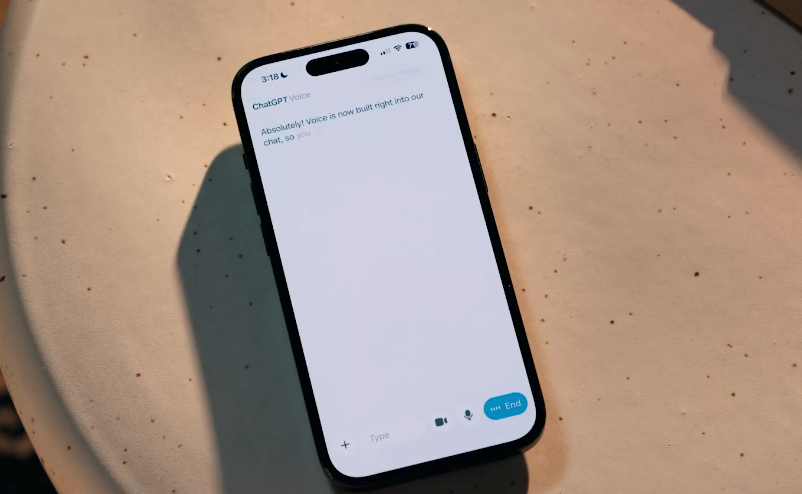
ChatGPT has updated its voice capabilities to integrate ChatGPT Voice into the main chat interface. Users can now directly click on the voice entrance to speak in the same conversation window, see the answer text appear in real time, and continue to view earlier chat history, and display pictures, maps and other visual content on the same screen, without having to switch to a separate voice mode.
This feature is gradually rolling out to mobile app and web users. Users can start a voice conversation by simply updating the ChatGPT App or browser-side website to the latest version, locating the voice button near the dialog input box, and granting microphone permission when using it for the first time. During use, you need to rely on a stable network environment and suitable equipment audio conditions, and pay attention to personal privacy and the feelings of others around you when using it in public or office settings.
From the perspective of product positioning, this integration aims to unify the voice and text conversation experience, making it convenient for users to get answers by voice when driving, doing housework or typing, while retaining the complete transcript for review and sharing. Due to the gradual launch, the actual opening hours of different regions and accounts may vary, and the specific availability is subject to the display of the respective terminal interface.
FAQs
Q: Where is the ChatGPT voice feature used now?
A: In the chat interface of the new ChatGPT mobile app or web page, a voice button will appear near the input box, and you can speak directly after clicking on it.
Q: What have changed in this voice update?
A: Voice conversation has been changed from a separate mode to a regular chat window, allowing users to see real-time text answers and related pictures, maps, and other content while talking.
Q: Who can use the new version of ChatGPT Voice?
A: This feature is planned to be rolled out to all users on mobile and web in batches, and whether it is already available depends on the interface seen by the personal account in the app or web page.
Q: Why can't I see the voice button after updating?
A: You may not have completed the batch push, or the app has not been successfully updated, you can try to check for updates in the app store and log in again, and then check whether the voice entrance appears in the chat interface.
Q: Are there any fees and duration limits for using ChatGPT voice conversations?
A: The voice portal itself is integrated into the product, and different user accounts may be subject to their respective service packages and usage rules, and the specific restrictions are subject to the actual subscription information and interface prompts.