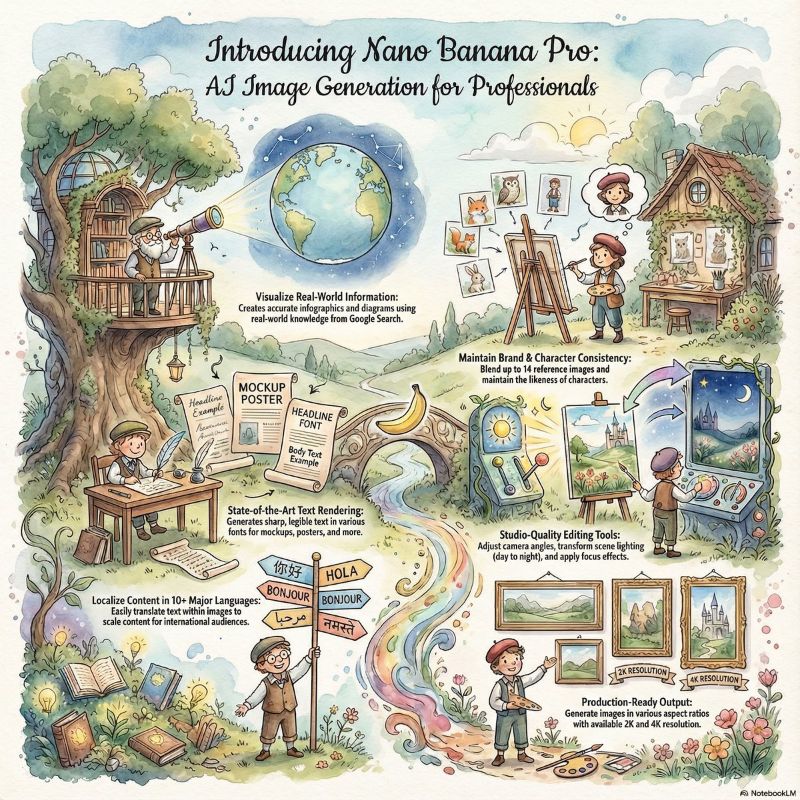
NotebookLM launches Infographic and Slide Decks capabilities for all users, and is deeply linked with Nano Banana Pro. AI can automatically convert materials into infographics and presentations, significantly shortening the time from research to presentation, suitable for high-frequency scenarios such as education, marketing, and reporting.
1. What pain points does this update solve?
1. From data to expression: Infographic and Slide Decks integration
NotebookLM reads multi-source data, automatically extracts key points, and generates Infographic and Slide Decks to ensure consistent narrative and unified graphics and text. Reduce back-and-forth handling and nesting costs.
2. More stable picture and text: Nano Banana Pro enhances
clear text, color and composition control in multiple languages, making it suitable for professional infographics and demo pages that require readable labels, indicator annotations, and brand consistency.
(1) Smoother team reuse
Thesame material can be derived from course handouts, review presentations and social media picture cards, and NotebookLM and Nano Banana Pro can be output collaboratively, with a higher reuse rate.
(2) Mobile and sharing are more convenient
Slide Decks can be displayed or exported as PDF directly in NotebookLM, supporting rapid distribution and review.
2. Standard workflow and efficiency improvement template
1. Five-step workflow
Clarify the audience and scene, upload information and mark the data caliber, generate the skeleton of Slide Decks with prompts, and then derive the Infographic key map, and finally unify the color matching and brand elements.
2. Three quality rules
Write the tone and structure of the prompt clearly, require the output of color matching and font suggestions, and use the fact-checking instruction to let NotebookLM check the source one by one and generate a proofreading list.
(1) Scenario-based parameter suggestions
Highlight conceptual definitions and example questions in educational scenarios; the marketing scenario highlights the comparison and selling points of pain points; Management report highlights indicators, timelines and responsible persons.
3. Suitable for people and version selection
1. Who should get started immediately
Content teams, training and teachers, brands and operations, independent creators, especially weekly and monthly knowledge accounts and activities that need to be quickly mapped.
2. Version and quota judgment
Prousers will be given priority to get higher quotas for Infographic and Slide Decks. Ordinary users can also experience the core process, and it is more cost-effective to run through the method first and then consider upgrading.
(1) Division of labor with traditional design
,deep customization and complex dynamics are handed over to designers; The weekly meeting review, course outline, and social media picture card were first produced by NotebookLM and Nano Banana Pro, and then manually edited and finished.
Frequently Asked Questions (Q&A)
Q: How can I make AI-generated Infographic data more accurate?
A: Upload the original forms and reports in NotebookLM, write down the data caliber and time range, request to output a list of data sources, and use fact-checking instructions to review key figures.
Q: What are the substantial improvements of Nano Banana Pro to Slide Decks and Infographics?
A: Nano Banana Pro offers clearer text rendering and fine-grained composition control, with more readable labels, titles, and annotations, making it suitable for multilingual presentations and brand visual unification.
Q: Can NotebookLM generate Slide Deck and Infographic based on the same data at the same time?
A: Yes. The logical structure and speech of the Slide Decks are automatically derived from the same data to ensure the consistency of narrative and visuals.
Q: How does teamwork work work into PPT or Slides?
A: Let NotebookLM output Slide Deck and export it, then unify the theme and brand color in Slides or PPT, and finally add sensitive data and notes by members to publish.