1. Basic Information
Artroom AI is a combination of an online platform and a local application for image generation and editing. It provides capabilities such as text-to-image, local inpainting and extension, layered canvas rendering, ControlNet control, and Lora-style model invocation. The platform offers parallel web-based creation, cloud-based inference, and local installation, lowering the barrier to entry and emphasizing controllability and efficiency over models and processes. Key keywords include Artroom AI, Stable Diffusion, ControlNet, Lora, layered editing, cloud-based generation, Windows local application, and shard quota.
2. Product Overview
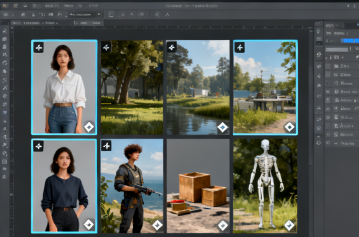
Artroom AI integrates prompt word input, parameter adjustment, canvas drawing and quality enhancement into the same interface through an integrated "generate-edit-export" workbench. The web version provides out-of-the-box cloud inference and features a gallery of works for community interaction; local applications are used to run on your own devices and are suitable for scenarios that emphasize privacy and offline. The platform integrates authorized Lora resources on the model side and provides ControlNet constraints such as posture, edge or depth to improve controllability. To balance cost and throughput, the website uses "shard" as the computing quota unit and supports different clarity and concurrency strategies.
3. Core Functions
1. Main functions
- Text-to-image and image-to-image conversion, covering multiple styles such as general, realistic, and two-dimensional.
- Layered canvas drawing supports coloring, brushing, and masking operations on the Paint palette, as well as Inpaint and Outpaint.
- ControlNet control to maintain consistent composition and motion based on pose, silhouette, or depth information.
- Lora model calls, integrating authorized sources and providing unlimited Lora overlays to mix characters and styles.
- A useful toolkit for background removal, magnification, and preset management, with support for queues and batch generation.
- The tutorial system and sample library provide systematic guidance on setup, prompt engineering, and advanced functions.
2. Technical characteristics
- Stable diffusion inference pipeline, with fine-grained control over visualization parameters such as number of steps, samplers, CFG, seeds, and VAE.
- Cloud GPU hosting, generating at resolutions ranging from 1K, 2K to 4K according to quota; supporting queuing and concurrency strategies.
- The model ecosystem that is linked to sources such as CivitAI emphasizes the use of only licensed model resources.
- Local applications are mainly aimed at Windows environments, providing one-click installation and a visual interface to lower the deployment threshold.
- The content compliance module restricts illegal and improper generation, clarifies that users have the right to create their own images and are subject to site regulations.
4. Pricing and Versions
The website offers tiered subscriptions: the Free plan provides approximately 120 shards per day and includes basic storage; Basic costs approximately $9 per month and includes 1K resolution and 10,000 shards; Pro costs approximately $29 per month and includes 2K resolution and 35,000 shards; and Premium costs approximately $59 per month and includes 4K resolution and 80,000 shards. Each tier typically includes queue generation, ControlNet, unlimited LoRa, background removal, and varying levels of storage. The platform also offers a native Windows installation package suitable for running on your own devices. Pricing, quotas, features, and available resolutions are subject to change over time and vary by region, so please refer to the current page for accuracy.
5. Applicable Scenarios and Target Audience
- Design and Illustration: Rapid proofing, style exploration, and poster main visual generation, combined with canvas layering for fine-tuning.
- E-commerce and branding: Use ControlNet to fix the pose and composition and batch-produce consistent product and scene images.
- New media and marketing: Use Lora to overlay and shape the account tone, and conduct multi-version A/B testing.
- Education and Training: Demonstrate engineering, parameter impact and local repair processes through a tutorial system.
- Studios and enterprises: A hybrid model of cloud and local to meet the requirements of collaborative division of labor and compliance.
6. Frequently Asked Questions
Q: What is the difference between the Artroom AI web version and the native app?
A: The web version relies on cloud GPUs, is billed according to shard quotas, and provides galleries and communities. Local applications run on your own devices and are suitable for scenarios that emphasize privacy and offline use.
Q: Does it support the overlapping use of ControlNet and Lora?
A: Yes. You can use a ControlNet fixed structure to overlay multiple licensed LoRa hybrid styles and roles in the same workflow.
Q: How to handle the ownership and compliance of generated content?
A: Users own the rights to the images they generate, but must comply with the platform's content policy; content involving sensitive and illegal topics will be strictly restricted and dealt with.
Q: What is the relationship between resolution and quota?
A: Subscription tiers limit the available resolution and monthly shards. Higher resolutions generally consume more quota. Throughput can be improved through queues and concurrency.
Q: Do you provide systematic tutorials and instructions?
A: Yes. The official tutorial covers basic setup, prompt engineering, Paint palette, background removal, zooming in, and ControlNet modules.