Back to AI information
Z.ai launched GLM-OCR online experience: supports PDF and image layout analysis

Z.ai launched GLM-OCR online experience: supports PDF and image layout analysis

AI information Admin 324 views

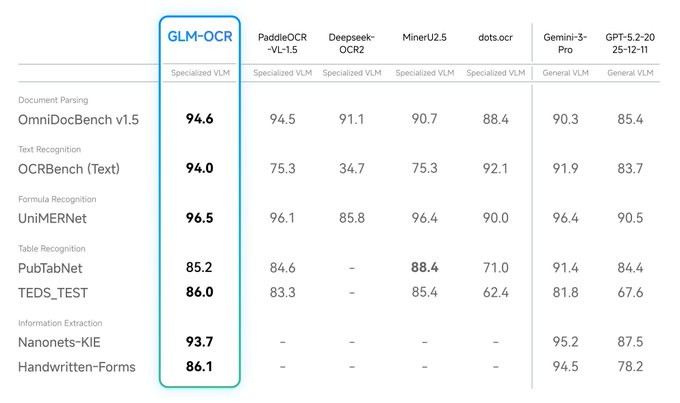
Z.ai released the multimodal OCR model GLM-OCR, which opens weights on Hugging Face, and provides online experience and API call methods. Officially, the model only has about 0.9B parameters, but it has achieved leading performance in complex document understanding tasks, covering scenarios such as formula recognition, table recognition, and key information extraction.

In terms of API usage, GLM-OCR supports the input of PDF and images (JPG/PNG), with a single image of no more than 10MB, PDF no more than 50MB, and a maximum of 100 pages. The output can include Markdown results and layout details for document parsing, data entry, and RAG document preprocessing. The actual effect will still be affected by scan quality, font mixing, seal occlusion and layout complexity, and it is recommended to conduct sampling evaluation and privacy compliance checks in the production environment.

FAQs

Q: What problems does GLM-OCR mainly solve?

A: GLM-OCR is suitable for OCR and understanding of complex documents, covering text, tables, formulas and information extraction.

Q: What inputs and size limits does GLM-OCR support?

A: GLM-OCR supports PDF and JPG/PNG, image ≤ 10MB, PDF ≤ 50MB, up to 100 pages.

Q: What are the forms of GLM-OCR output results?

A: GLM-OCR can output Markdown text results and return structured information related to layout.

Q: Does GLM-OCR provide an online experience and API?

A: Z.ai provides API interface descriptions on the online experience page and developer documentation.
What is GLM-OCR: Complex document OCR model analysis with 0.9B parameters GLM-OCR release points: Table recognition and formula recognition capabilities at a glance GLM-OCR Weight Download Guide: How to Get and Use Hugging Face GLM-OCR Online Experience Portal: ocr.z.ai functions and usage steps GLM-OCR API Access Tutorial: Request Parameters and Return Results GLM-OCR for PDF Parsing: Layout Understanding and Text Structuring Methods GLM-OCR table recognition measured ideas: from images to structured output GLM-OCR Formula Recognition Application: OCR Restoration Scheme for Papers and Courseware GLM-OCR information extraction capability: key field extraction and structured processes GLM-OCR layout analysis interface: layout_parsing functions are explained in detail GLM-OCR output Markdown: Practical tips for converting documents to MD The difference between GLM-OCR and traditional OCR: Comparison of document understanding capabilities High performance of GLM-OCR small models: advantages and boundaries of lightweight deployment GLM-OCR Deployment Guide: Recommendations for Local Inference and Serviceization Interfaces Usage of GLM-OCR in RAG: Document Cleaning and Segmentation Strategies GLM-OCR Adaptation Scans: Recommendations for Handling Low Definition and Noise Scenes GLM-OCR Handling Seal Occlusion: Common Failure Causes and Avoidance Methods GLM-OCR Multilingual Mixed OCR: Key points of Chinese-English mixed document analysis Application of GLM-OCR in Invoice Recognition: Example of Field Extraction Process Application of GLM-OCR in Contract Interpretation: Extraction of Clauses and Key Information Application of GLM-OCR in Resume Parsing: Structured Field Extraction Method Application of GLM-OCR in Form Recognition: Layout Alignment and Field Positioning GLM-OCR outputs structured data: how to reprocess JSON results GLM-OCR performance evaluation method: own sample sampling and index design GLM-OCR Pre-launch Checklist: Key Points of Quality Assessment and Regression Testing GLM-OCR Privacy & Compliance: Considerations for Sensitive Document Handling Comparison of GLM-OCR and Open Source OCR: Selection Dimensions and Trade-off Suggestions GLM-OCR Document Understanding Capabilities: Parsing strategies for complex layouts The role of GLM-OCR in knowledge base construction: the process of pre-database document storage GLM-OCR table restoration tips: spread table and merge cell processing Key points of GLM-OCR formula transcription: Common problems with symbols and upper and lower scripts GLM-OCR Text Extraction Quality Improvement: Image Preprocessing and Layout Optimization Suggestions GLM-OCR Error Case Study: Inventory of common misidentification types GLM-OCR Service Stability: Engineering Recommendations for Concurrency and Timeout GLM-OCR interface return fields: How to understand layout and text hierarchy GLM-OCR vs. Markdown workflows: from PDF to editable documents GLM-OCR for Data Entry: An Automation Solution for Efficiency GLM-OCR for Auditing and Archiving: Bulk Document Structuring Practices GLM-OCR for Customer Service Tickets: Image and PDF Information Extraction Method GLM-OCR for educational materials: OCR collation process for test papers and handouts GLM-OCR is used for scientific papers: high-quality reproduction of formulas and tables GLM-OCR Online Experience Evaluation: Observation of the performance of different types of documents GLM-OCR Weights and Licenses: Points to Focus on Before Using GLM-OCR API Billing and Restrictions: Matters that need to be confirmed before accessing GLM-OCR combined with layout model: the benefits of layout analysis GLM-OCR Structured Extraction Template: Field Definition and Validation Strategy GLM-OCR implementation best practices: from pilot to scale GLM-OCR FAQ Summary: Input Format and Output Parsing Guide GLM-OCR Update and Ecosystem: Toolchain and Community Resource Portal

Recommended Tools

More

