
Codex is stuck and not responding? Check by approval, terminal, and log check
If Codex is stuck and unresponsive, do not send the same message repeatedly. Confirm in order whethe
AI Music Maker is an AI music tool for quick composition and song generation, focusing on generating complete music, beats, or lyrics in seconds. The official website showcases a set of related tools such as AI Lyrics Generator, AI Music Extend, AI Vocal Remover, AI Stem Splitter, AI Voice Clone, Album Cover Generator, and AI Music Video Generator, which can not only generate songs from prompts, but also continue to do track splitting, vocal processing, and music extension. It's suitable for short-form video creators, podcast teams, individual music lovers, and content teams that need to quickly test the direction of a melody.
AI Music Maker's focus is on "fast". The official website directly positions the product as an AI-powered music and song generator, emphasizing lyrics and beats in one click and creating music in seconds. For those who need to do a mockup, opening score, or inspiration test first, it's more like a ready-to-use music draft generator.
AI Music Maker is more than just a one-page music generator. The navigation on the homepage also provides entrances such as AI Lyrics Generator, AI Music Extend, AI Vocal Remover, AI Stem Splitter, AI Voice Clone, AI BPM Tap, Album Cover Generator, AI Music Video Generator, etc., indicating that it combines music generation, expansion, and basic post-processing into a creative tool chain.
It is suitable for these things:
The official website states that Creators Worldwide uses it to produce music for videos, podcasts, celebrations, and artistic projects, and this positioning is clear: it is not only for professional producers, but for people who need to produce audio content quickly. Short video accounts, podcast shows, event planners, independent developers, and music inspiration recorders are all suitable for this group.
It will be handy if you just want a version that you can try out right away; If you need to fine-tune each instrument track, harmonic advance, and mixing parameters, it's better for pre-drafting rather than final production environments.
AI Music Maker is great for going from "idea" to "first version". However, the generation results will still be affected by prompts, style descriptions, and model selection, and the versions generated by the same requirement may vary greatly. For commercial use, you should also confirm the download permissions and the scope of usage of generated content in your current plan.
Additionally, while powerful features like Voice Clone, they still need to adhere to licensing and compliance boundaries when it comes to real human voices or sensitive content. The platform can provide technical capabilities, but it does not mean that all usage scenarios are automatically reasonable.
Can AI Music Maker only generate songs and not audio? **
not. The official website navigation also provides tools such as vocal remover, stem splitter, music extend, voice clone, etc., so it can not only generate music, but also process and extend existing audio materials.
Is it suitable for short videos and podcast soundtracks? **
It is more suitable. The official website clearly mentions use cases such as videos and podcasts, indicating that the product itself is designed for the needs of fast soundtracks in content creation.
Is AI Music Maker suitable for professional studio workflows? **
It is more suitable for early creativity and quick sampling. Official releases, complex arrangements, and demanding mixing projects often require a more specialized audio production process.
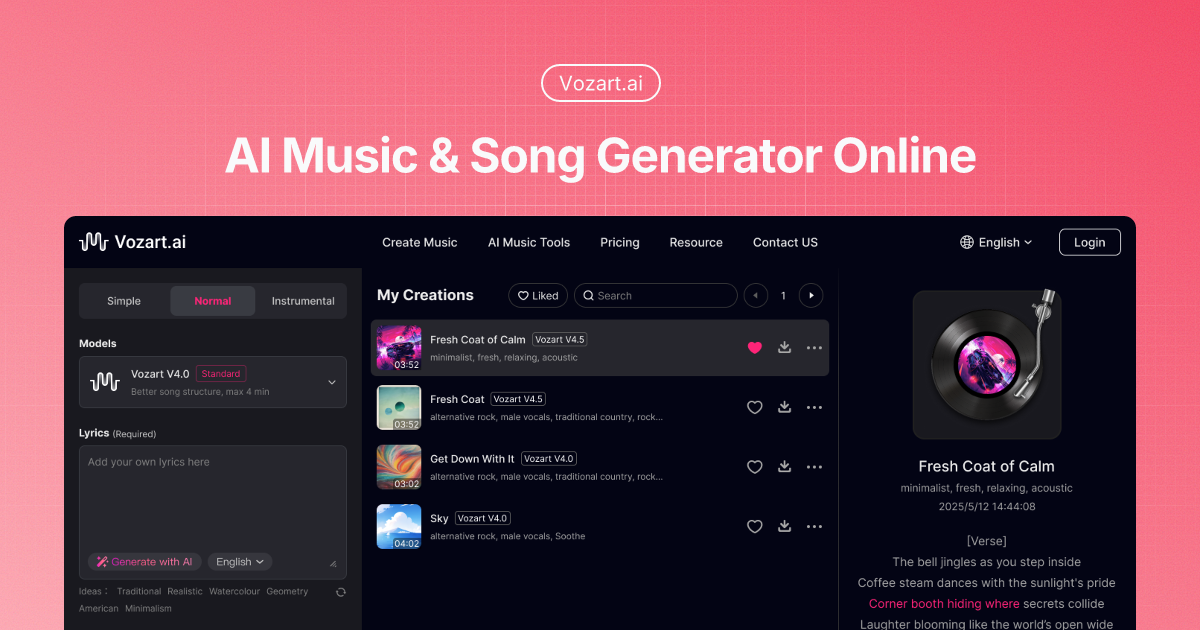
Vozart is an AI music and lyrics generator primarily aimed at music creators, short video teams, and lyric writers for generating drafts of songs, lyrics, and music ideas. It's better for people who already have clear footage, scripts, customer communications, or business processes to centralize song generation, lyric writing, and music drafts into a more performable workflow. When using it, you need to focus on music copyright, style originality and post-production, especially when it comes to customer information, character voices, image materials, web page data or published content, you should first confirm authorization and manual review. Overall, Vozart is suitable as an auxiliary tool for generating drafts of songs, lyrics, and music ideas, rather than a complete replacement for the final judgment of editors, operations, R&D, or management.

Vocs AI is an AI music and sound design tool for teams and creators who need a practical way to generate, organize, convert, or review work before it moves into a final production flow. It is best used with clear source material, a defined output goal, and a human review step for accuracy, rights, privacy, and publishing quality.

Vertate is an AI music and sound design tool for teams and creators who need a practical way to generate, organize, convert, or review work before it moves into a final production flow. It is best used with clear source material, a defined output goal, and a human review step for accuracy, rights, privacy, and publishing quality.

UniMusic AI is an AI workflow tool for teams that need to create, organize, convert, or review task-specific material before final use. It should be used with clear source material, a defined output goal, and human review for accuracy, rights, privacy, and publishing quality.

TinyMusic is an AI workflow tool for teams that need to create, organize, convert, or review task-specific material before final use. It should be used with clear source material, a defined output goal, and human review for accuracy, rights, privacy, and publishing quality.

Text to Song is an AI tool for users who need a clearer way to handle focused digital work. It can support creation, automation, analysis, learning, media production, development, research, customer operations, or document workflows depending on the product scope. Start with a small low-risk task, compare the result with your own standards, and keep human review for facts, permissions, privacy, brand voice, safety, and final delivery.

If Codex is stuck and unresponsive, do not send the same message repeatedly. Confirm in order whethe

codex exec In CI, it can analyze code without making changes; first check the sandbox: non-interacti

If Codex Skills is installed but does not trigger, first check if it is located in the scan director

Codex config.toml changes that don't take effect usually don't mean the TOML file is corrupted, but

After exiting the Codex CLI, you don't need to redescribe the entire task; just run codex resume sel

On August 3, 2026, the Qwen team released the Qwen 3.8-Max on the official Qwen blog, positioning it