Back to AI information
ChatGPT adds support for command invocation and manual addition in settings

ChatGPT adds support for command invocation and manual addition in settings

AI information Admin 98 views

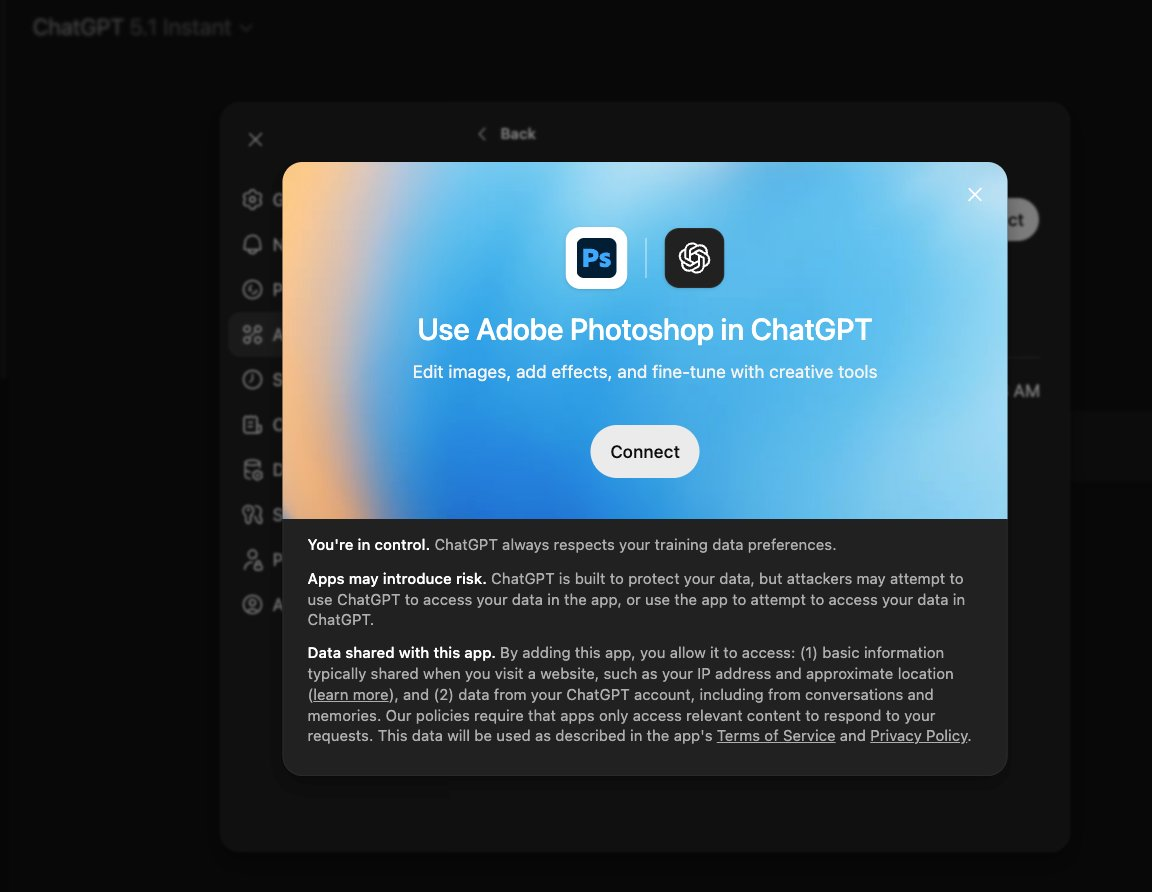
Adobe announced that it will integrate Adobe Photoshop into ChatGPT as an application to connect image editing and generation capabilities. According to the official example, users can directly enter their requirements (e.g., blurring background, cutout, color grading, etc.) in chat, and the system will automatically invoke the corresponding app and complete the editing and preview within the conversation, without having to open desktop or web Photoshop separately.

If the app does not automatically pop up by default, users can go to Settings → Apps & Connections in ChatGPT, search for and add Adobe Photoshop apps, and complete the Adobe account authorization to use the relevant capabilities. Once enabled, it can also be quickly recalled by typing "/Photoshop". Please note that the specific features, build quality, and usage limits may be related to the type of Adobe subscription, region, and account permissions you have, and some premium features may only be available to paid or specific plan users.

FAQ

Q: How do I call Adobe Photoshop in ChatGPT?

A: The easiest way is to start with "Adobe Photoshop" in the conversation to describe the desired editing effect, and the system will automatically call up the application and return the processing result.

Q: Why doesn't the Photoshop panel appear after entering a command?

A: The app may not be enabled yet, find Adobe Photoshop in Settings → Apps & Connections and add it manually, then retry the command or use "/Photoshop".

Q: Do I have to sign in to my Adobe account before using it?

A: You usually need to connect or sign in to your Adobe account to call cloud services and enable editing based on your subscription permissions.

Q: Can ChatGPT on mobile also be used with Photoshop applications?

A: It can be used on platforms and versions that support Apps & Connections, depending on whether the actual client provides an application management portal.

Q: Will image uploads and edits be saved to the Adobe cloud?

A: Relevant images are generally handled in accordance with Adobe and ChatGPT's respective privacy and service terms, and users should read and confirm the data and content use policies before use.

Adobe launches Adobe Photoshop integration with ChatGPT ChatGPT has built-in Adobe Photoshop for conversational retouching Adobe Photoshop integrates ChatGPT to open up image workflows ChatGPT invokes Adobe Photoshop to complete editing with one click Adobe has announced the arrival of Adobe Photoshop on the ChatGPT platform Adobe Photoshop in ChatGPT provides real-time retouching previews ChatGPT and Adobe connect image generation and editing Users use Adobe Photoshop directly in ChatGPT Adobe Photoshop integration empowers ChatGPT to enhance creation ChatGPT becomes a conversational portal for Adobe Photoshop Adobe has partnered with ChatGPT to launch conversational retouching capabilities Adobe Photoshop Enters ChatGPT to Unlock a New Editing Experience ChatGPT supports Adobe Photoshop blur background cutout color grading Adobe Photoshop integration reinvents ChatGPT visual workflows ChatGPT Integrates Adobe Photoshop for Enhanced Creative Efficiency Adobe Photoshop and ChatGPT join forces to enhance image editing ChatGPT calls Adobe Photoshop to achieve one-stop retouching Adobe Photoshop integration powers ChatGPT image creation ChatGPT Expands Editing Boundaries with Adobe Photoshop Adobe Photoshop integrates ChatGPT for enhanced dialogue generation ChatGPT input commands go straight to Adobe Photoshop editing Adobe Photoshop integration makes the retouching process smoother ChatGPT is powered by Adobe Photoshop to optimize the creative closed loop Adobe Photoshop is connected to enrich ChatGPT's multimodal capabilities ChatGPT and Adobe Photoshop work together to shorten production cycles Adobe Photoshop makes ChatGPT more knowledgeable about retouching ChatGPT integration with Adobe Photoshop improves the preview experience Adobe Photoshop Access Boosts ChatGPT Visual Upgrade ChatGPT joins forces with Adobe Photoshop to strengthen the creative link Adobe Photoshop integration elevates ChatGPT professionalism ChatGPT directly connects to Adobe Photoshop to lower the barrier Adobe Photoshop and ChatGPT build a conversational editing paradigm ChatGPT integration with Adobe Photoshop brings new efficiencies Adobe Photoshop is now available to make ChatGPT even more user-friendly ChatGPT docking with Adobe Photoshop supports multiple rounds of iterations Adobe Photoshop Fusion ChatGPT simplifies the retouching steps ChatGPT and Adobe Photoshop for intelligent retouching Adobe Photoshop integration with ChatGPT focuses on generation and editing ChatGPT connects directly to Adobe Photoshop to improve the onboarding speed Adobe Photoshop adds ChatGPT to enrich creative scenarios ChatGPT integrates with Adobe Photoshop to expand visual capabilities Adobe Photoshop integration brings a preview advantage to ChatGPT ChatGPT and Adobe Photoshop create a conversational retouching experience Adobe Photoshop is now available with ChatGPT to optimize workflows ChatGPT with Adobe Photoshop supports fast filmmaking Adobe Photoshop integration elevates ChatGPT ease of use ChatGPT supports Adobe Photoshop to build a creative closed loop Adobe Photoshop with ChatGPT elevates the image editing paradigm ChatGPT integration with Adobe Photoshop enhances multimodal interactions Adobe Photoshop is connected to ChatGPT to lead conversational retouching

Recommended Tools

More

