Back to AI information
Code Editor Cursor 2.2 Released Debug mode, visual planning, and pinned dialog are launched simultaneously

Code Editor Cursor 2.2 Released Debug mode, visual planning, and pinned dialog are launched simultaneously

AI information Admin 186 views

AI coding tool Cursor announced the launch of version 2.2, adding Debug Mode to the core, and simultaneously improving Plan Mode planning mode and multi-agent review capabilities. Debug Mode automatically inserts log statements in the project, starts a local debug server, collects runtime data, and streams it back to the intelligent agent to reproduce and locate complex bugs, covering a wide range of technology stacks and language scenarios.

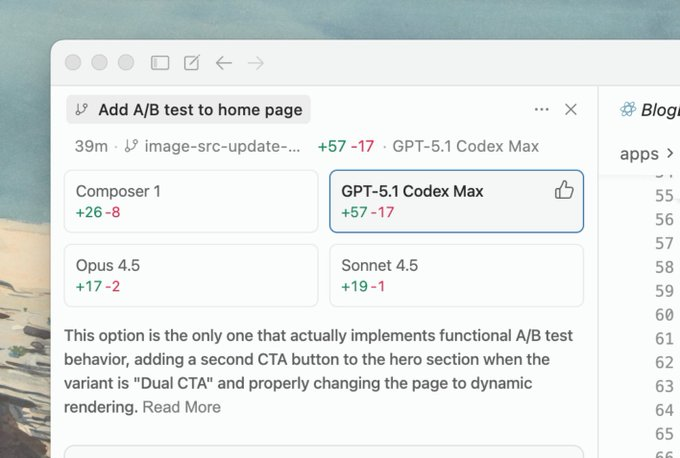
In terms of planning, this update brings Plan Mode to support inline Mermaid charts, allowing agents to generate visual flowcharts directly in the planning view and allowing users to send some backlogs to new agents individually. At the same time, when running multiple agents in parallel, the multi-agent review function automatically compares different solutions and provides recommended results and text explanations, reducing the developer's manual comparison cost. The version also adds interface optimizations such as "Pinned Dialogue", which focuses more on continuous collaboration and problem tracking in long-term projects.

FAQ

Q: What exactly can Cursor 2.2's Debug Mode do?

A: It adds logs to the code and starts a local service to collect runtime data, which is then provided to the agent for analysis and fixing hard-to-reproduce bugs.

Q: What are the substantive improvements to Plan Mode this time?

A: The new version supports directly generating Mermaid charts in the plan, and can split the selected to-do items for new agents to execute, making it easier to disassemble complex tasks.

Q: How does multi-agent review work?

A: When running multiple agents in parallel, the system will automatically evaluate each solution after all of them are completed, and mark the recommendation results and reasons for the recommendation.

Q: Are these new features also available to free users?

A: The official description is for current Cursor 2.2 users, and the specific permission distinction still depends on the account package and the platform used.

Q: Do I need to perform special migration operations for old projects after the update?

A: Existing projects can continue to be used after upgrading the client, but if you want to enjoy Debug Mode and other capabilities, you need to authorize the project and complete the basic configuration as prompted.


The release of Cursor 2.2 brings both debugging and planning upgrades Cursor 2.2 adds Debug Mode to support complex bug location Cursor 2.2 optimizes Plan Mode to enhance the task planning experience Cursor 2.2 introduces a multi-agent review mechanism to improve collaboration efficiency Cursor 2.2 releases enhancements to intelligent agent collaboration Cursor 2.2 adds local debug server and log insertion functions Cursor 2.2 introduces Mermaid charts for visual planning Cursor 2.2 improves Plan Mode to support flowchart generation Cursor 2.2 has been released to optimize the task disassembly experience for complex projects Cursor 2.2 multi-agent parallel review of automatic recommendation schemes Cursor 2.2 supports runtime data streaming backhaul analysis Cursor 2.2 releases enhanced cross-language stack debugging capabilities Cursor 2.2 Debug Mode realizes automatic collection of running data Cursor 2.2 Plan Mode supports inline Mermaid flowcharts Cursor 2.2 improves multi-agent collaboration and task execution efficiency Cursor 2.2 adds pinned dialogs to optimize the collaboration experience for long projects Cursor 2.2 is released to help developers improve their issue tracking efficiency Cursor 2.2 optimizes debugging mode to support multiple language scenarios Cursor 2.2 Plan Mode supports split execution of complex tasks Cursor 2.2 multi-agent review automatically generates recommendation results Cursor 2.2 Debug Mode automatically inserts log statements to analyze bugs Cursor 2.2 Plan Mode visualizes task planning for more intuitive purposes Cursor 2.2 releases improvements to the project debugging and collaboration process Cursor 2.2 introduces intelligent agent parallel review function Cursor 2.2 updates focus on continuous collaboration and issue tracking The new version of Cursor 2.2 debug mode improves the development experience Cursor 2.2 released to optimize the agent planning and execution link Cursor 2.2 provides the ability to stream debug data Cursor 2.2 improves Plan Mode to make planning more efficient and intuitive Cursor 2.2 adds a multi-agent solution comparison and recommendation mechanism Cursor 2.2 updates enhance continuous collaboration on long-term projects Cursor 2.2 released the full-chain optimization plan for debugging planning and review Cursor 2.2 improves intelligent agent collaboration and decision-making Cursor 2.2 introduces a multi-agent automatic review recommendation mechanism Cursor 2.2 releases planning views that support Mermaid charts Cursor 2.2 adds Debug Mode to automate the debugging experience Cursor 2.2 improves Plan Mode to improve flowchart readability Cursor 2.2 multi-agent review reduces manual comparison costs Cursor 2.2 releases focus on problem targeting optimization for complex projects Cursor 2.2 improves the efficiency of agency planning and execution collaboration Cursor 2.2 updates and optimizes the entire process from project debugging to review Cursor 2.2 Debug Mode helps developers reproduce complex bugs Cursor 2.2 Plan Mode visualization enhances planning efficiency Cursor 2.2 multi-agent collaboration brings higher quality solutions Cursor 2.2 release brings an all-in-one experience for commissioning and planning Cursor 2.2 introduces new features to enhance the project tracking experience Cursor 2.2 optimizes the interface to support pinned conversations Cursor 2.2 releases to enhance continuous collaboration and task management The new version of Cursor 2.2 supports multilingual stack debugging and analysis Cursor 2.2 upgrades to optimize the overall capabilities of intelligent agents

Recommended Tools

More

