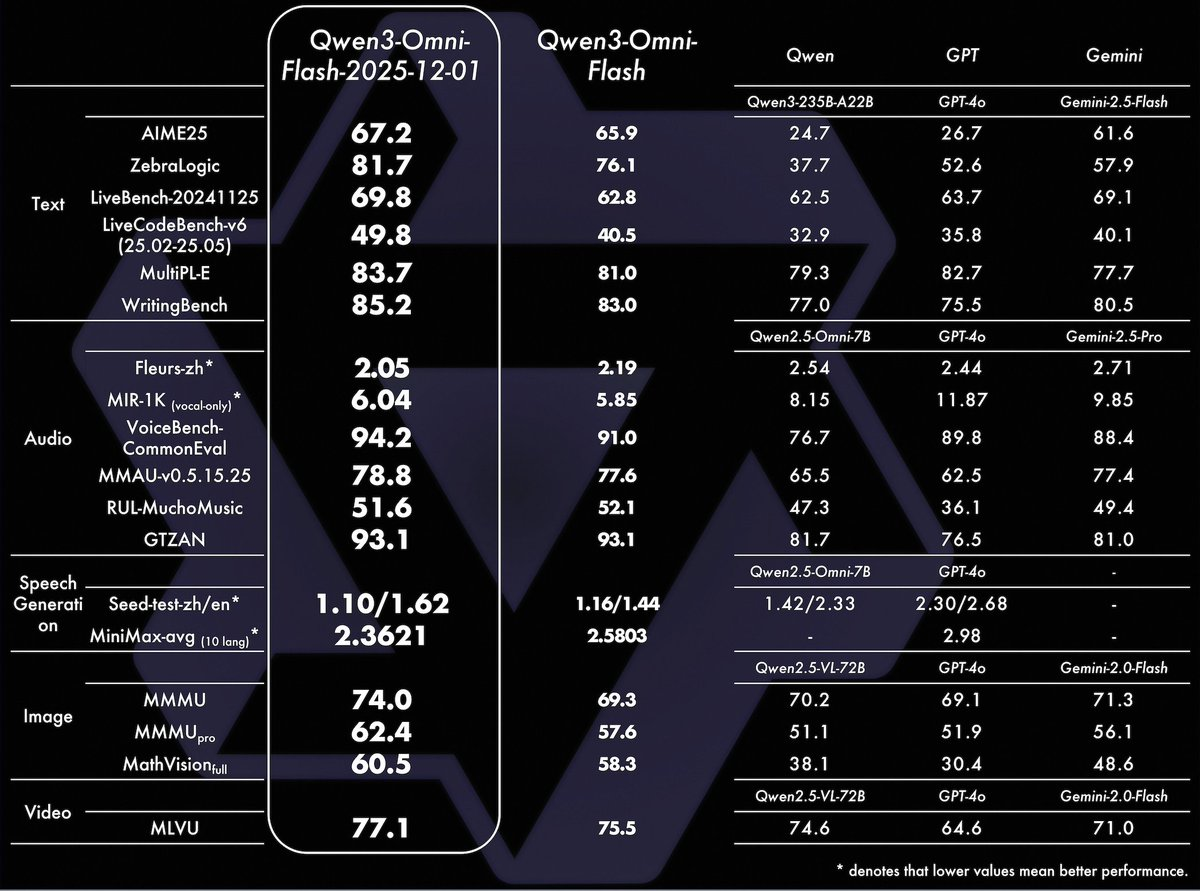
Alibaba Cloud Tongyi Qianwen team has launched Qwen3-Omni-Flash 2025-12-01 version, which has significantly upgraded video and audio dialogue, voice interaction, and multilingual processing. The new version is closer to natural dialogue in multiple rounds of video and audio understanding, can continuously track scene and context changes, and supports customized dialogue personalities through system prompts, adapting to differentiated application scenarios such as role-playing and virtual assistants.
In terms of language and voice, the new version of Qwen3-Omni-Flash supports 119 text languages and 19 voice languages, focusing on more stable multilingual dialogue and recognition capabilities, and the speech synthesis effect emphasizes "close to real people", which is suitable for long-term voice chatting, content creation and intelligent customer service and other scenarios. The official web version of the portal allows users to directly experience voice and video conversations through the VoiceChat and VideoChat buttons at the bottom in Qwen Chat.
This upgrade opens up both real-time and offline API forms: real-time API for streaming voice conversations and multimodal interaction, and offline API for batch processing and local integration. Developers can also experience the demo version through the public space on Hugging Face and ModelScope, view documentation and configure access permissions in the Alibaba Cloud console. During use, you need to pay attention to account quotas, fees, and voice data security, and choose online or offline mode based on business needs.
FAQsQ
: What is the Qwen3-Omni-Flash 2025-12-01 version?
A: This is an important upgrade to Qwen3-Omni-Flash, focusing on improving multi-round AV understanding, multilingual processing, and human-like speech synthesis capabilities.
Q: What are the new features of this upgrade?
A: Includes more natural multi-turn video and audio conversations, customizing personalities with system prompts, more stable support for 119 text languages and 19 voices, and more realistic speech synthesis.
Q: How can ordinary users experience the new version of Qwen3-Omni-Flash?
A: You can enter voice or video conversation mode on the Qwen Chat web page through the VoiceChat and VideoChat buttons in the lower right corner of the interface, without additional installation.
Q: What is the difference between Realtime API and Offline API?
A: The Realtime API focuses on low-latency streaming conversations and real-time voice scenarios, while the Offline API is better suited for batch processing, backend services, or application integrations with low network dependency.
Q: What are the considerations when using voice and video capabilities?
A: Pay attention to account access rights, call costs, and data compliance, and avoid unauthorized uploading of voice and video data containing sensitive personal privacy or supervised content.