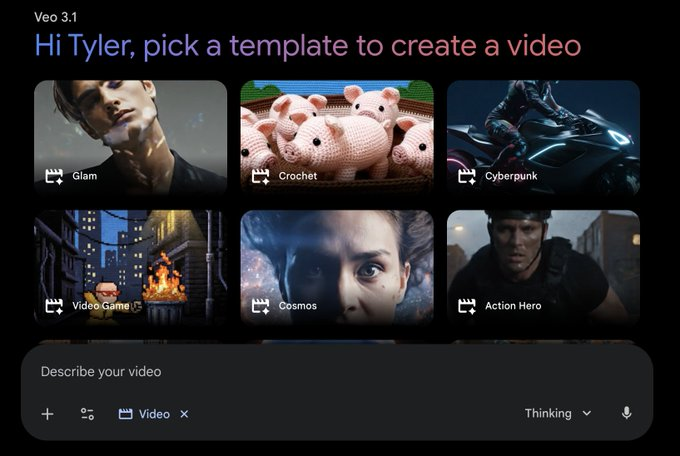
Google is testing the experimental template gallery feature related to Veo 3.1 with a small number of invited users in the Gemini app. Users can click "Create videos" in the tool menu to enter the template library, choose from preset templates and submit to generate videos, or customize the template effect by uploading their own images.
Currently, this feature is only in the testing stage, targeting a small range of users, and not all regions and accounts can see the entrance. Officials encourage users participating in the test to submit experience feedback within the app for subsequent adjustments to template content, generation quality, and interaction processes. The timeline for the official availability of the feature to all users has not yet been announced, and details such as supported languages, account types, and usage restrictions are still not fully clear.
FAQs
Q: What is the feature of Gemini's "Template Gallery"?
A: This is a new entry under the video generation function of Veo 3.1, which supports quick video generation through preset templates and can customize the content to a certain extent.
Q: Who can currently use this template library?
A: Only some invited Gemini Apps users will see "Create videos" in the tools menu and access to the template gallery, and it is not yet fully available.
Q: How do I generate videos using the feature?
A: Users click "Create videos", select their favorite template and submit, or upload their own images to replace the screen elements in the template, and the system will generate a video.
Q: What should I pay attention to during the testing phase?
A: The function is in an experimental state, there may be unstable effects, limited number of templates, etc., and may be adjusted or taken offline at any time, users need to pay attention to the in-app prompts.