Back to AI information
Google Mixboard releases a major update: Nano Banana Pro and multi-board project features are added

Google Mixboard releases a major update: Nano Banana Pro and multi-board project features are added

AI information Admin 123 views

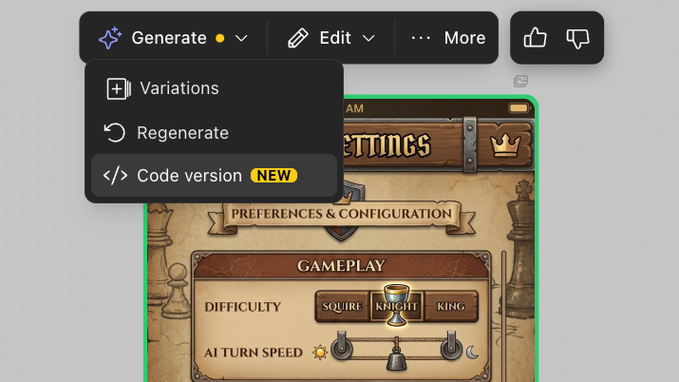
Mixboard, Google's creative collaboration tool, has announced a major feature update with a package of improvements to help users explore and organize their creative ideas more efficiently. One of the highlights of this update is the introduction of Nano Banana Pro capabilities, which allow users to automatically create presentations directly based on existing content in Kanban using the latest image generation models, quickly transforming fragmented footage into showcaseable finished products.

In terms of file and project management, Mixboard adds support for file types such as PDF, HEIC, and TIFF, allowing users to centrally manage images and documents from multiple sources in a single space. At the same time, the Multi-Board Projects capability is introduced, allowing multiple Kanban boards to be grouped into the same project view, making it easier for teams to create and archive in different dimensions around the same topic. According to reports, this update also includes several experience and performance optimizations, which are open to all users for trial.

FAQs

Q: What is the Nano Banana Pro?

A: This is a new presentation generation feature in Mixboard, which can automatically generate presentation materials based on the content of the Kanban board by calling the latest image model.

Q: What file types are newly supported in this update?

A: PDF, HEIC, and TIFF formats have been added to the original base for easy direct uploading and previewing.

Q: What is Multi-Board Projects used for?

A: Multiple boards can be organized under one project, which is suitable for unified management of different split directions under the same theme.

Q: Are these new features available to all users?

A: The official description has been launched in the Mixboard experimental environment, and general users can directly enter the product page to experience it.

Q: How can I get started with the new abilities that come with this update?

A: Visit the Mixboard page to log in to your account to experience Nano Banana Pro, multi-board projects, and new file format support in existing or new projects.
Google creative collaboration tool Mixboard update analysis Mixboard launches NanoBanana Pro demo generation feature Automatically generate PPT based on Kanban using NanoBananaPro Mixboard content one-click presentation tutorial Mixboard Fragments are quickly converted into a display method Mixboard adds support for PDFHEICTIFF file format Mixboard centrally manages multi-source image and document practices MixboardMultiBoardProjects Introduction to multi-Kanban projects Multi-Kanban projects manage creative cases with the same theme in a unified manner Mixboard multi-dimensional split creative Kanban board organization skills New features in Mixboard help you explore and organize your ideas efficiently How design teams use Mixboard to collaborate on brainstorming The product team uses Mixboard to manage requirements and program experience NanoBananaPro image model generation demonstration advantages NanoBananaPro and traditional PPT production efficiency comparison Experience new feature guidance in the Mixboard lab environment Mixboard supports new file format uploads and preview instructions The Mixboard project view is applicable to usage scenarios A review of the experience and performance optimizations brought by the Mixboard update How to enable the NanoBananaPro capability in Mixboard Use NanoBananaPro to automatically generate project debriefing steps Mixboard is a method of organizing Kanban materials into presentation documents Mixboard file and project integration management best practices Mixboard supports the collaborative process of PDF design review Manage high-quality picture tricks like HEICTIFF with Mixboard Mixboard supports more file types that are valuable to teams Use MultiBoardProjects to collaborate across Kanban Considerations Mixboard tags and archiving strategies under the multi-board project How creative teams use Mixboard to build a library of themed projects Explain whether the Mixboard update is open to all users How new users can quickly get started with the latest version of Mixboard Old users experience the real experience of Mixboard's new capabilities after upgrading Mixboard is suitable for remote distributed creative team collaboration Use Mixboard to organize your brand marketing creative process Application of Mixboard in product planning and solution presentation NanoBananaPro generates the actual effect of the visual display Mixboard incorporates image generation models to drive creative workflows Feasibility analysis of replacing traditional presentation tools with Mixboard Mixboard Multi-Kanban Structure Design FAQs How the team agrees on the naming convention of the Mixboard and the project A way to distinguish between a draft Kanban board and a formal project in Mixboard List of file types supported by Mixboard and description of restrictions How enterprises can manage large projects across departments in Mixboard Educational Scenarios Use Mixboard to organize course teaching material cases Analysis of the impact of Mixboard updates on designers' daily creative processes How to quickly prepare a client proposal presentation with Mixboard Mixboard's new features have been applied in creative agencies Mixboard works with other Google tools to use the technique Through Mixboard, the project process output review experience is unified In the future, we look forward to Mixboard's further opening up API and external integration

Recommended Tools

More

