Back to AI information
It is reported that Google is developing a model switching feature for NotebookLM that supports Flash and Pro models

It is reported that Google is developing a model switching feature for NotebookLM that supports Flash and Pro models

AI information Admin 98 views

Recently, the

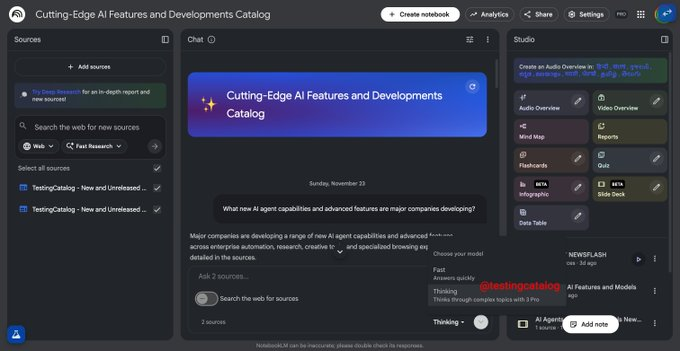
developer community leaked information that Google is working on a built-in model selector for NotebookLM, providing a drop-down menu in the interface that allows users to switch between different models such as Gemini Flash and Pro, in order to make trade-offs between responsiveness and output quality depending on the task. The description shows that this feature is still in the testing stage and is not yet generally available in the official version of NotebookLM.

Based on the available revelations, the model selector is expected to appear in NotebookLM's main interaction area, integrating with the current conversation and knowledge base features. Users can choose the default fast Flash model when working on scenarios such as long document organization, study notes, or report generation, or switch to the Pro model when they need higher inference quality and performance on complex tasks. Google has not publicly stated when the feature will be officially launched, nor has it been clarified whether it will only be available to paid or enterprise users, and the specific permissions and billing methods are still to be confirmed.

Frequently Asked Questions

Q: Is NotebookLM's model selection feature now live?

A: Currently, there are only test-related revelations and have not yet been widely available in the official version of NotebookLM.

Q: What models can I switch between in NotebookLM?

A: The main thing mentioned in the revelation is to choose between the Flash and Pro models in the Gemini series, and the details have not yet been announced.

Q: Why do I need to switch between Flash and Pro models?

A: Generally speaking, Flash is more geared towards fast and low cost, while Pro is more suitable for complex inference and high-quality output, with different task focuses.

Q: Will this model selector be available to all users?

A: There is currently no official explanation, and it may be tied to NotebookLM Plus or Enterprise plans, or it may be gradually released in stages.

Q: When can I use it on my account?

A: Google has not yet released a timetable, and whether the feature will be implemented and the specific pace will need to wait for the official announcement later.
NotebookLM's built-in model selection function is exposed NotebookLM supports switching between GeminiFlash and Pro Google Test NotebookLM Model dropdown Select different large models in the note learning scenario Trade-off speed quality by task in NotebookLM GeminiFlash is suitable for fast and low-cost answers GeminiPro is used for complex inference and high-quality output The NotebookLM model selector is still being tested in grayscale The official version of NotebookLM is not yet open for model switching Model selection features or first for paying users Whether NotebookLM Enterprise Edition supports Pro first Users can switch models in long document organization Choose a faster Flash when learning note generation Deep report writing scenarios enable GeminiPro NotebookLM model permissions and billing are still to be confirmed Google has not yet announced a timeline for new features for NotebookLM NotebookLM integrates conversational knowledge base with model selection Quickly switch between NotebookLM engines in the same interface NotebookLMPlus packages may be bound to model selection The developer community leaked screenshots of NotebookLM's new interface The significance of NotebookLM model switching for educating users Enterprise users balance cost performance in NotebookLM Model selector or support automatic recommendation by document NotebookLM supports selecting the best model for the task Google's multi-model strategy extends to the NotebookLM product Analysis of differences between Gemini series models in NotebookLM Use Flash for daily summaries and key point extraction Complete research-level in-depth analysis with Pro NotebookLM model selection may introduce new billing logic NotebookLM testing is not yet available to all accounts How to choose the right Gemini model in NotebookLM Note-based AIAssistant introduces the trend of multi-model switching NotebookLM model selection affects creator workflows Academic users use Pro in NotebookLM to improve quality Students use Flash to quickly generate class notes NotebookLM may support more Gemini variants in the future NotebookLM model selector with Plus subscription relationship Multi-model NotebookLM helps reduce latency and improve the experience NotebookLM model control enhances user control NotebookLM's closed beta function reflects the rhythm of Google's products NotebookLM model selection may be gradually launched by region NotebookLM Knowledge Base Q&A changes the model according to your needs NotebookLM's model strategy in long document learning The model selector interface is deeply integrated with the current dialog area Whether the NotebookLM model switches support team collaboration Analysis of the impact of NotebookLM model selection on privacy policy The NotebookLM model selects how the usage quota will be recorded NotebookLM users are looking forward to the official announcement of the launch time NotebookLM model selects or introduces task-level configurations Best practices for using NotebookLM in the multi-model era

Recommended Tools

More

