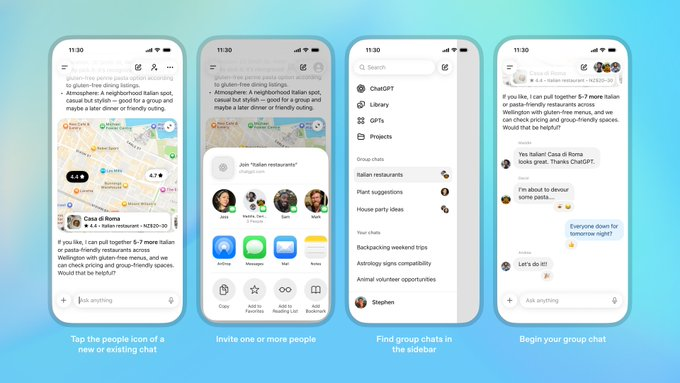
OpenAI announced on its official website and changelog that it has begun piloting the ChatGPT group chat feature in Japan, New Zealand, South Korea, and Taiwan. This feature, which allows multiple users to join the same session with ChatGPT to plan trips together, make decisions, or collaborate on projects, is currently rolling out on web, iOS, and Android clients.
Officials said that group chats are open to logged-in ChatGPT Free, Go, Plus, and Pro users, and each group can invite up to about 20 members to join the same conversation through a shared link. Group chats are independent of individual conversations, and participants' personal memories are not shared between group chats, and are mainly used to collect early feedback to decide whether to expand to more regions and packages in the future.
FAQsQ
: In which regions is ChatGPT group chat currently available?
A: Currently, the group chat function is only piloted in Japan, New Zealand, South Korea, and Taiwan, and users in other regions are not open for the time being, so you need to wait for subsequent expansions.
Q: Who can use the group chat feature?
A: Official description: Group chats are open to logged-in ChatGPT Free, Go, Plus, and Pro users, as long as the account region is within the scope of the pilot.
Q: How many people can I invite to a group chat?
A: Users can invite multiple people to join the same conversation through a shared link, and the current official example is up to about 20 members plus ChatGPT to participate in a group chat.
Q: Will the content in the group chat be leaked to my personal "memory"?
A: OpenAI emphasizes that group chats and individual conversations are independent of each other, personal ChatGPT memories are not shared in group chats, and group chat content is not automatically written to the personal memories of other people's accounts, and privacy rules are still enforced in accordance with ChatGPT's existing policies.
Q: How do I start a ChatGPT group chat?
A: According to the official instructions, users can click the "Multi-Person" icon in the upper right corner of the new or existing conversation interface to create a group chat, and invite friends, family, or colleagues to join through the generated link to collaborate with ChatGPT.