Back to AI information
Opera One has released a new update: Tab Islands now support naming and custom colors, and the developer version is already available for trial.

Opera One has released a new update: Tab Islands now support naming and custom colors, and the developer version is already available for trial.

AI information Admin 84 views

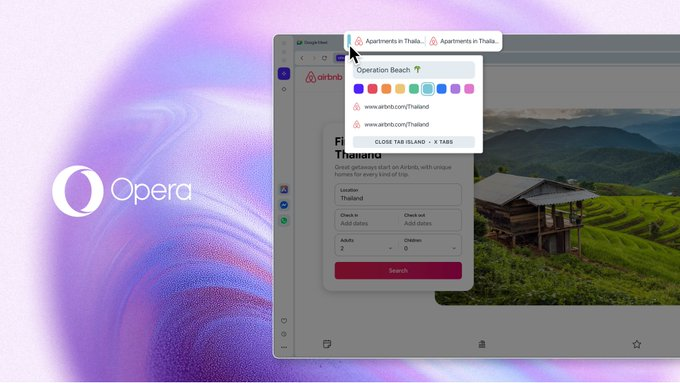
Opera has announced a second round of feature updates for Opera One, focusing on enhancing the personalization capabilities of Tab Islands. According to the official blog post dated November 4, 2025, this update allows users to name each tab island and customize the color of its "handle" for quick identification and task allocation in complex browsing scenarios. Users can simply hover their mouse over a tab island handle to bring up a new tooltip and complete the naming and color scheme. These changes respond to the community's long-standing demand for naming and color control, making multitasking and contextualized browsing easier to maintain.

The official statement also indicated that this update is part of the Opera One R3 rollout process and is currently available for testing through the early access Opera Developer channel. The stable version will be gradually integrated later. Combined with previous optimizations to tag history and layout, the new feature aims to reduce the cognitive burden when dealing with a large number of tags simultaneously, helping users achieve instant organization and continuous management using both color and semantic cues.

Frequently Asked Questions

Q: What specific new features have been added?

A: It supports naming each Tab Islands and allows you to choose the island handle color; simply hover over the tab handle to complete the settings via a tooltip.

Q: Where can I experience it firsthand?

A: Test downloads are available in Opera Developer (developer channel), and it will gradually be rolled out to a stable version as R3 progresses.

Q: How does this feature differ from the earlier Tab Islands?

A: In the past, grouping and folding were mainly done automatically/manually; this time, semantic naming and color coding have been added to enhance visual management and retrieval efficiency.

Q: Will this affect the use of existing labels and workspaces?

A: It does not affect the original grouping method; naming and color scheme are optional enhancements, suitable for users who have multiple projects running in parallel or long sessions.

Q: Is there any official operation guide?

A: The blog provides a brief guide: Hover over the tab island handle and use the new options that pop up to complete the naming and color selection.

OperaOne tab island naming color update Tag islands support custom color naming. Hover island handle brings up tooltips settings Visual management of a large number of tags in parallel Quickly organize clues based on color and semantics R3 Phase 2 Second Round Feature Enhancement Interpretation OperaDeveloper channel early access The stable version will gradually integrate new capabilities. Naming the tag islands satisfies the long-term needs of the community. The island handle color helps with multitasking. Recognition optimization in complex browsing scenarios Tag history and layout optimization are linked Without changing the original grouping and folding logic Naming color schemes are an optional enhancement feature. Contextualized browsing of multiple projects in parallel Continuous management of long-term session tags Simply hover your mouse over the color to name or select it. TabIslands semantic organization OperaOne R3 Update Highlights Reduced cognitive burden of browser tabs Upgrade based on automatic and manual grouping Download and toggle paths from the developer channel Color coding improves search efficiency Workspace and tag island used together Tag Island Handle Interaction Details and Feedback How to set an independent theme for each island Color scheme for grouping similar tasks Best practices for naming project tags Browsing task division scheme in team collaboration Organization method for adapting to multiple screens and multiple windows Beginners can quickly learn how to name their tag islands. Advanced color matching strategies for experienced users Quickly restore the island's state from historical records In conjunction with the sidebar structured navigation Decompression solutions for tag explosion scenarios Semantic naming facilitates context switching Color contrast and readability suggestions R3 Roadmap and Subsequent Integration Schedule Comparison with other browser grouping features How to start testing in an early version The impact of tag island naming on search Breakpoint recovery and island-level session protection Island Handle Tips and Language Localization Custom rules and enterprise scenario applications Visual hierarchy and cascading style considerations User feedback-driven product improvement A consistent tab island experience across platforms Used in parallel with AI summarization and other functions Multi-task research and writing scenarios Tag grouping strategy during development and debugging

Recommended Tools

More

