Back to AI information
Windsurf launches Codemaps: using AI to extend code understanding, claiming "Fight slop".

Windsurf launches Codemaps: using AI to extend code understanding, claiming "Fight slop".

AI information Admin 119 views

Cognition (Windsurf) announced the launch of its Codemaps feature in its IDE. The core goal is to help engineers and AI build a shared understanding of the same codebase, reducing the quality slippage caused by "rapid changes with low understanding." The official blog post, published on October 29, 2025, describes Codemaps as generating code maps in real-time for each task, displaying structure, data flow, and dependencies. Users can switch between list and visualization views, and click on nodes to directly access relevant lines of code. The product messaging emphasizes "Fight slop with Codemaps," highlighting a "understand first, then modify" workflow.

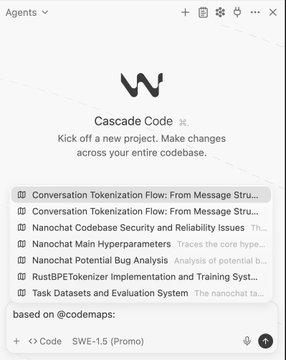
As seen in public demos and community posts, Codemaps are now enabled in the Windsurf sidebar. Users can open it via keyboard shortcuts or icons, input task prompts, and generate corresponding maps. During generation, users can choose between Fast (SWE-1.5) and Smart (Sonnet 4.5) modes. Discussions suggest that this feature, in conjunction with previous capabilities like DeepWiki and Cascade, is suitable for locating the impact of changes and analyzing control flow and dependencies in large or legacy codebases. However, the actual effectiveness still depends on the repository size, index completeness, and model selection; real-world benefits need to be validated in team scenarios.

Frequently Asked Questions

Q: What exactly does Codemaps do?

A: Windsurf IDE generates a "code map" based on the current repository and task prompts, displaying module relationships, data flow, and dependencies in a structured view and visual diagram. Nodes can be jumped to the corresponding code location with one click.

Q: When was it launched?

A: The official blog detailed the feature on October 29, 2025; it was subsequently promoted to users through the official X and community posts with the message "Codemaps is now live".

Q: What models or configurations are required?

A: When generating maps, you can choose between Fast (SWE-1.5) and Smart (Sonnet 4.5); different modes balance speed, detail, and cost to suit different tasks.

Q: What is its relationship with DeepWiki and Cascade?

A: Codemaps focuses on "instant understanding and navigation" and can be used in conjunction with documentation (DeepWiki) and automated execution (Cascade/agent) to first establish shared understanding and then drive modification and implementation.

Q: Can the "AI slop code" problem be solved?

A: Codemaps reduce risk by improving code comprehensibility, but they are not a single-point solution that guarantees quality; engineering practices such as code review, testing, and dependency security are still essential.


WindsurfIDE launches Codemaps Codemaps facilitates shared understanding of large codebases. The Practice of Anti-slope Workflow: Understand Before Modifying FightSlopwithCodemaps slogan interpretation Sidebar shortcut to open code map with one click Generate structure and data flow diagrams in real time according to tasks. Clicking a node will take you directly to the corresponding line of code. Dual-mode switching between list view and visualization Supports sorting out module dependencies and control flow relationships Fast mode SWE-1.5 quick generation experience In-depth analysis of Smart mode Sonnet 4.5 DeepWiki and Codemaps Documentation Collaboration Cascade proxy and map-driven changes implementation Reduce the risks caused by rapid changes with low comprehension. Methods for locating the impact of legacy system changes The impact of index completeness on map quality Model selection involves a trade-off between speed and detail. Team-level scenario verification and actual benefit assessment Feature Release Recap (October 29, 2025) WindsurfIDE Built-in Code Understanding Toolbox Code maps help with cross-repository context switching Establishing a unified code context in multi-person collaboration Visual review of the global structure before reconstruction Demand-driven code navigation path Comparison with traditional search redirection methods Complex Dependency Chains and Data Flow Tracing Tools Adaptation of large monolithic warehouses to microservice scenarios Strengthening AI-Assisted Engineering Quality Access Control Map-level preparation process before code review Evaluate the impact of modifications in conjunction with test coverage. Code visualization improves the learning speed for newcomers. Traceable link from work item to line of code Map-centered understanding-first practice Preventing a decline in the quality of AI-generated rough code Improve the determinism and security of cross-module modifications Task prompts and engineering help improve map accuracy Supports hierarchical expansion by folder and module. Adaptable to heterogeneous code libraries with multiple languages and frameworks The map results can be reused as team knowledge assets. Combined with DeepWiki's design and semantics Complementary relationship with code search and navigation Support impact surface verification in incremental development Integrate PR templates into engineering process specifications Focus on understanding navigation rather than automatic rewriting The trade-off between local indexing and cloud analytics Audit aids suitable for security-sensitive warehouses Visual layout helps identify abnormal coupling A perspective for architects and techleaders Enhancing the shared context between AI and engineers Promotion and Measurement of Enterprise Warehouse Implementation

Recommended Tools

More

