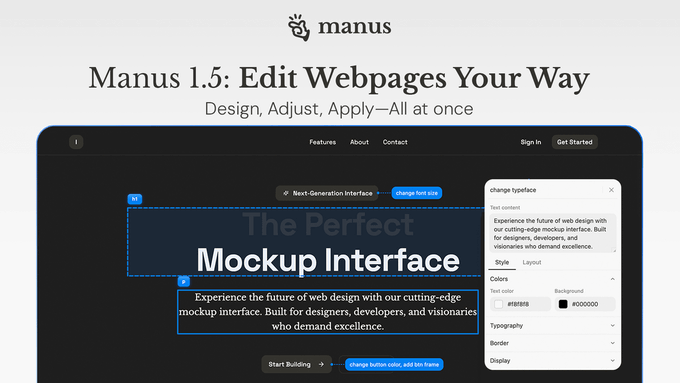
Manus has announced the release of version 1.5 of its web editor upgrade. This core change replaces the traditional "edit and wait" process with instant style control and batch processing based on prompts. Users can now access "Quick Style Control" directly on the page to instantly adjust visual attributes such as color, font, spacing, and borders. Furthermore, with "Prompt Editing and Batch Processing," the same changes can be applied to multiple sections or pages simultaneously, significantly reducing revision time and the cost of repeated submissions.
This update continues the efficiency-focused approach of Manus 1.5: while maintaining build quality, it optimizes web editing processes to accommodate frequent use cases, from minor style changes to entire site-wide adjustments. For specific usage instructions and entry points, please refer to the official website and demo post.
Frequently Asked Questions
Q: What elements can be modified by Quick Style Control?
A: It supports common visual attributes such as color, layout (font/size), spacing, borders, etc. Changes take effect immediately and can be rolled back.
Q: How to use batch editing?
A: Describe the goal in natural language (such as "change all H2 headings to darker colors and increase line spacing"), and the system will apply the rules to matching elements in one click.
Q: What improvements are there compared to the previous process?
A: The overall revision time is significantly shortened by changing from "submitting one section at a time - waiting" to "changing immediately - applying in batches with one click".
Q: Does it apply to the entire site?
A: Depending on the selection scope and matching rules, you can unify the style of a single page, multiple pages, or the entire website; the specific details are subject to the actual selection and preview.
Q: Where can I view the demo and entrance?
A: See the official Manus announcement and demo post. If you don't see the entry, you can update to the latest version according to the instructions on the product page.