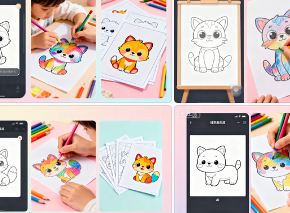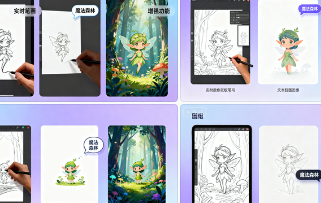
1. Basic Information
Muse Pro is a real-time AI painting app for iPad and iPhone, emphasizing a "stroke-guided AI" creative approach. It supports text-to-image, random generation, detail enhancement, and print-quality enlargement. The app offers traditional painting tools like layers, brushes, and an asset panel. A slider controls the intensity of AI intervention, and Apple Pencil pressure sensitivity creates a natural brushstroke experience. Key keywords include Muse Pro, AI painting, text-to-image, real-time collaboration, enlarged printing, Apple Pencil, layers, and brushes.
2. Product Overview
Muse Pro features real-time AI collaboration during the creative process. Users can enter prompts to change direction at any time during the drawing process or quickly explore compositions using random seeds. The system also provides a Vision feature, which uses AI to describe the image, helping to understand and iterate the current sketch. One-click enhancements can enhance detail and texture after generation, and further magnification is supported to meet the needs of printing and high-resolution presentations. The overall workflow covers the entire chain from sketching and iteration to finished product export, suitable for a variety of use cases, from personal creativity to classroom presentations.
3. Core Functions
1. Main functions
- Real-time collaborative drawing, brushstrokes drive AI output, and display as you draw.
- Text to image and prompt word guidance, quickly change the direction and style of the picture.
- Random seeds and pauses work together to facilitate inspiration exploration and periodic manual refinement.
- Enhance and enlarge with one click to output high-resolution results suitable for printing.
- Vision screen description automatically generates textual understanding of the current work.
- Layer management, asset panel, and various brushes support the combined creation of shapes, images, and text.
2. Technical characteristics
- Apple Pencil pressure sensitivity support improves line fineness and control.
- Use the slider to precisely control AI engagement, allowing creators to maintain control over composition and details.
- Randomness and seed management enable reproducible multi-version iteration.
- The local canvas and cloud-based inference work together to balance speed, quality, and controllability.
- Mobile-centric interface and performance optimization, adapted to iPad live creation process.
4. Pricing and Versions
Muse Pro is available as a free trial download, with core features available on iPad and iPhone. Full capabilities and higher usage are typically unlocked through in-app purchases or subscriptions. Pricing, benefits, and regional availability may change over time and vary by region, so please refer to the current App Store and official website for details.
5. Applicable Scenarios and Target Audience
- Illustration and concept design: Use randomness and prompts in the sketching stage to accelerate exploration and quickly converge on a style.
- Education and classroom demonstration: Demonstrating generative authoring methods through Vision description and real-time collaboration.
- Studio and commercial projects: One-click enhancement and enlargement for posters, proofs, and printing needs.
- New media and content production: Complete the entire process from conception to drawing on mobile devices to improve publishing efficiency.
- Students and beginners: Learn to work with AI using cues and in the familiar environment of layers and brushes.
6. Frequently Asked Questions
Q: Is Apple Pencil required for Muse Pro?
A: It is not necessary, but using Apple Pencil can provide pressure sensitivity and more natural line control, which is a better experience.
Q: Can the AI engagement of Muse Pro be adjusted?
A: Yes. You can control the intensity of AI intervention with a slider, and you can pause the collaboration at any time to manually refine it.
Q: Does it support high resolution and print output?
A: Yes. The app provides enhancement and magnification features, allowing you to output images suitable for printing and high-definition presentations.
Q: How does text-to-image and random exploration work together?
A: First determine the direction with the prompt word, then explore variants in batches using random seeds, and continue to refine or enhance after screening.
Q: Is there a mobile integrated workflow?
A: Yes. The app integrates layers, brushes, assets, and export, making it perfect for creating complete artwork on your iPad or iPhone.