1. Basic Information
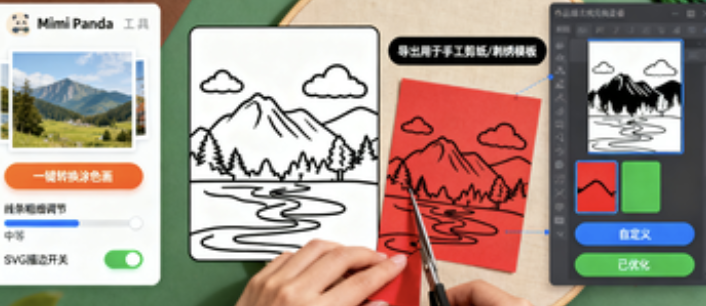
Mimi Panda is an online coloring and picture book creation platform for children and adults. Its core capability is to automatically convert photos into printable black and white line drawings, and can generate numbered coloring and AI-style coloring pages. The platform provides a web workbench and a personal account system, and completes the creation process around uploading images, selecting parameters, generating and downloading. The system has a built-in coloring page catalog and examples covering animals, people, architecture, and holiday themes. It also supports tools such as generating AI images, image enlargement, and line drawing optimization. The platform has a free trial and a points system, so new users can directly experience the core conversion functions.
2. Product Overview
The platform focuses on converting photos into coloring pages. After uploading pictures, users can choose the line accuracy and detail threshold to quickly obtain a black and white draft suitable for printing. For painting practice and decoration needs, the system provides numbered coloring modes and color references to facilitate beginners to color by area. The AI generation capability can directly generate coloring pages or intermediate style pictures based on text prompts, and improve printing clarity through magnification and quality enhancement. For vectorization and post-typesetting, the platform provides conversion of pictures into editable SVG strokes, which is convenient for secondary editing in design software. The coloring library on the site can download a limited number of selected works on a weekly basis, and the generated results can be retained privately or displayed publicly.
3. Core Functions
1. Main functions
Convert photos to coloring pages, automatically extract outlines and generate clear line drawings
Generate numbered colors, output marked partitions and color matching prompts
AI generates coloring pages and images, and quickly produces pictures based on prompts
Image enlargement and quality enhancement, suitable for high-resolution printing
Convert images to SVG strokes for easy secondary editing and layout
Coloring page catalog and weekly downloads, providing themed materials
2. Technical characteristics
Multiple levels of detail and color accuracy parameters, taking into account both outline fidelity and noise control
Tasks are charged based on points, and conversion and amplification consume independent quotas.
Generate batch candidate images, and return multiple pages of coloring results in a single request
Supports watermark and non-watermark export to meet the differentiated needs of preview and formal use
4. Pricing and Versions
The platform uses a combination of a free trial and a subscription. After registering, you'll receive trial credits, which can be used to complete a number of coloring pages and zoom-in operations. Full subscriptions include personal and commercial subscriptions, which differ in terms of monthly credits, per-request usage, number of downloads, and watermarking. Subscribing also unlocks lower per-request costs and higher concurrency. Specific names, credits, and prices are subject to the current page and may vary by region and promotional period.
5. Applicable Scenarios and Target Audience
Line drawing exercises and classroom printables for preschool and K12 art education
Making themed coloring books for parent-child crafts and festival activities
Theme explanation support and commemorative album production for museums and camps
Quickly extract outlines and convert layouts into vectors for illustrations and design drafts
Interactive materials and downloadable gifts for social media and self-media content
6. Frequently Asked Questions
Q:What credits are included in Mimi Panda's free trial?
A: New accounts will receive a fixed amount of points, which can be used to complete a certain number of photo coloring and enlargement operations; the specific number of times and activities will be adjusted over time, and are subject to the page display.
Q: Can I export editable vector line art?
A: It supports converting images into SVG strokes, which is suitable for secondary adjustment of line width and composition in design software.
Q: How to generate and download numbered coloring pages
A: Check the numbering mode on the generation page to get a version with partition and color matching prompts, which supports high-resolution export for printing.
Q: How to distinguish commercial authorizations?
A: The authorization scope of personal and commercial subscriptions is different. For external sales and paid use of courses, you should choose the commercial version and follow the current terms.
Q: How to improve the quality of line drawings?
A: It is recommended to upload a clear original image with low noise, appropriately improve the details and color accuracy, and use the zoom function before exporting to obtain better printing clarity.