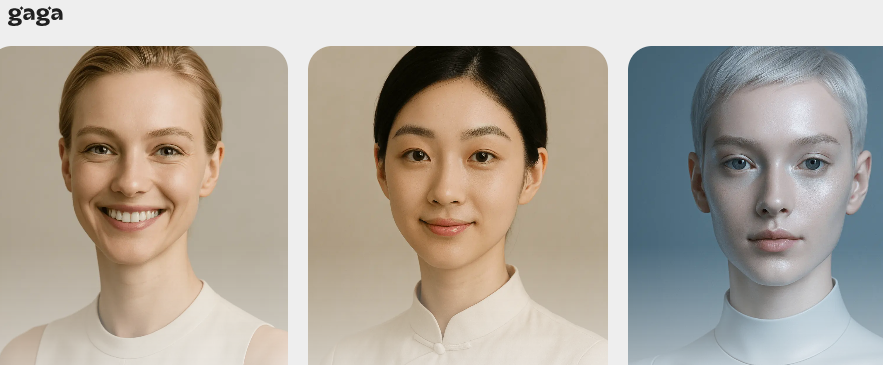
Gaga AI, a platform based on gaga.art, features AI-powered avatar and voiceover generation for photo-to-video conversion. For creators who are constantly on deadline, lack filming conditions, or are not photogenic, Gaga AI can automatically combine a photo and a script into a short video with natural expressions, lip syncing, and gestures, significantly lowering the barrier to entry for content creation.
1. Who is Gaga AI suitable for?
- Short videos and self-media creators
- Scenario: Daily manuscript pressure, insufficient materials, and inconvenience in going out for filming.
- Problems: Live-action filming is time-consuming, lighting and venue costs are high, and the spoken word needs to be re-recorded multiple times.
- Solution: Gaga AI uses photos and scripts to quickly generate spoken-word videos, eliminating the need for framing and makeup touch-ups, and ensuring frequent updates.
- Brand and e-commerce team
- Pain points: Frequent release of new products, requiring multiple versions of explanation videos; high budget for models and photography.
- Limitations: Traditional methods have a long process from script to finished film and are difficult to reuse.
- Change: Gaga AI reuses the same "digital spokesperson", batch changes scripts and styles, and quickly adapts to different channels.
- Education and training and B2B marketing
- Requirements: Stable and professional lecturer.
- Value: Gaga AI unifies its image and tone across courseware, lectures, and FAQ videos, continuously delivering credible content.
2. What problems can Gaga AI solve?
- High production threshold
- Performance: The shooting equipment, lighting, sound recording and post-production editing are complex.
- Solution: Gaga AI automatically synthesizes “images—dubbing—expressions—lip movements—gestures” into an integrated system, allowing even novices to produce usable films.
- Low update efficiency
- Reason: The wait was caused by the coordination of the real-life schedule and the venue.
- Mechanism: Gaga AI is based on a cloud-based model. A slight script change can re-render in seconds, and it supports multi-version testing and iteration.
- Inconsistent image
- Comparison: Traditionally, multiple actors have inconsistent accents and styles.
- Method: Gaga AI uses the same profile picture and voice line to maintain brand consistency, while switching style templates according to the scene.
3. Detailed explanation of how to use Gaga AI
- Basic preparation
- How to get it: Visit gaga.art to register and log in. Free trials and paid plans are available.
- System requirements: A modern browser is sufficient.
- Registration process: Create an account via email → Log in to the console → Enter the generation page.
- Quick Start
- Key steps for first-time use:
- Upload a clear front-facing photo or choose a template profile picture.
- Paste the script text, or upload the voiceover audio.
- Select the voice and emotion intensity, and check the gesture/expression synchronization.
- Set the resolution, duration, and background; click Generate Preview.
- Important function locations: avatar library, script editing area, voice and emotion panel, gesture switch, export settings.
- Basic operation: Repeatedly fine-tune the script pauses and punctuation to improve lip alignment and natural tone.
- Practical skills
- Improve efficiency: Each sentence in the script should not exceed 15 words, and pauses should be marked to make lip syncing easier.
- Problems to avoid: The photo should have even lighting and clear facial features; avoid large obstructions and strong backlighting.
- Advanced suggestion: Save the preset "avatar + voice + subtitle style" for different channels to form a brand-fixed template.
4. Gaga AI Practical Application Cases
- Product launch announcement
- Background: The e-commerce store launches 3 new products per week.
- Operation: Fix brand avatar → Import three core selling point scripts → Generate vertical screen videos in batches → Add subtitles to produce the video.
- Results: Production time was reduced from half a day to 30 minutes, and the conversion video was released on the same day.
- Short videos on popular science knowledge
- Background: Education Daily Question.
- Operation: Create a "teacher image" avatar → import scripts in batches → automatically generate a series of spoken broadcasts → unify the subtitle template.
- Effect: Updated articles for 30 consecutive days without missing any posts, and fan interaction increased.
- Event poster "Speak Up"
- Background: Offline roadshows require eye-catching screen materials.
- Operation: Use the main visual character photo → enter the host's words → select exaggerated gestures → generate a looping video.
- Effect: The booth visit rate increased and more leads were collected.
5. Gaga AI FAQ
Q: Is Gaga AI free to use?
A: Gaga AI offers a free tier, which is suitable for experiencing avatar creation and short video generation functions.
Q: Are Gaga AI’s lip movements and expressions natural?
A: Gaga AI emphasizes precise lip shape and delicate expressions, and can synchronize gestures, making the finished video look close to real-life dictation.
Q: How does Gaga AI improve brand consistency?
A: Gaga AI can fix the same avatar and voice, and save templates to maintain a unified image on multiple platforms.
Q: Can Gaga AI generate Gaga in batches?
A: Gaga AI supports script reuse and multi-version export, which is suitable for multi-SKU and multi-channel delivery.
Q: Does Gaga AI have an API?
A: Gaga AI provides an open platform and API, making it easy to integrate generation functions into your own systems or pipelines.