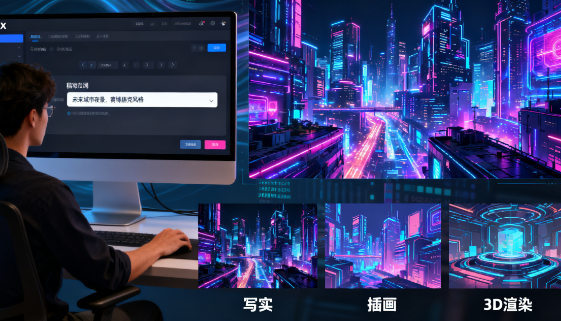
Black Forest Labs' FLUX is a generative image model and tool for creative and commercial use cases, encompassing generation, editing, filling, and expansion capabilities. For teams frequently designing KVs, product images, and posters, the lack of FLUX often means extensive rework, difficulty acquiring resources, low efficiency, and difficulty maintaining a consistent visual style.
1. Who is Black Forest Labs FLUX suitable for?
- Brand and e-commerce operations
- Scenario: The new product launch period requires a large number of product pictures and scene pictures with unified style.
- Problem: Traditional photography and photo editing are expensive and time-consuming.
- Solution: Use FLUX.1 Kontext combined with "text + reference image" to quickly generate customized images, and then use Fill and Expand to add backgrounds or expand the canvas, significantly shortening production time.
- Content and We-media Team
- Pain points: high daily update frequency, wide range of topics, and insufficient material reserves.
- Limitations: Traditional image libraries have inconsistent styles, and post-production adjustments require a lot of work.
- Change: With the help of FLUX Playground's style presets and collection functions, reusable material styles are precipitated to achieve stable batch creation.
- Game and Creative Studio
- Requirements: Need to quickly produce concept drawings and character settings in a unified style.
- Value: By opening weights or enterprise-customized fine-tuning, FLUX can ensure style consistency and compliant delivery, supporting rapid iteration.
2. What problems can Black Forest Labs FLUX solve?
- It’s difficult to compose a picture from scratch
- Performance: When pure text is generated, the image tends to deviate from expectations.
- Solution: FLUX.1 Kontext supports "writing pictures and texts together". By uploading reference pictures, you can lock the layout and materials, and then use prompt words to refine the style to generate more accurate results.
- The photo editing process is long
- Reason: Traditional cutouts, stitching, and masking take a lot of time.
- Solution: FLUX.1 Fill and Expand support directional local replacement and canvas expansion, ensuring natural connection of details and reducing manual retouching costs.
- Difficulty in unifying styles
- Comparison: Manual templates and manual specifications are difficult to stabilize.
- Solution: Use the Finetuning feature to upload 5-20 samples to train a unique style model and maintain the consistency of the series of works.
3. Detailed explanation of how to use Black Forest Labs FLUX
- Basic preparation
- How to obtain: Use directly on FLUX Playground; can also be integrated into business processes through API; enterprise users support self-deployment.
- Fees: Playground is priced by points, with an example price of 1,000 points ≈ $10. API and enterprise plans are subject to separate negotiation.
- System requirements: Modern browsers are sufficient. Please refer to the official documentation for API usage.
- Quick Start
- Step 1: In the Playground, select the "Generate / Edit / Fill / Expand" function and choose the appropriate model (such as FLUX.1 Kontext or Pro/Ultra).
- Step 2: Enter detailed prompt words (subject, material, lighting, style), and upload reference pictures for "picture and text writing at the same time".
- Step 3: After generation, use editing tools to further refine local details and save to Favorites for reuse.
- Practical skills
- Improve efficiency: Use a small size to quickly generate various solutions, and then use Ultra mode to improve clarity after determining the direction.
- Common problems to avoid: If characters or products appear distorted, use reference images or reduce the intensity of the style.
- Advanced method: If brand unification is required, you can use Finetuning to train a dedicated LoRA model and adjust the finetune_strength parameter during generation.
4. Black Forest Labs FLUX Practical Application Cases
- New posters on e-commerce platforms
- Background: 8 sets of key visuals need to be produced within 48 hours.
- Operation: Use Kontext to input product reference images and prompt words to generate the main image, then use Fill to replace the background and props, and Expand to adapt to different sizes.
- Results: 3 times more efficient, consistent style and ready to use.
- Unified character image
- Background: Short video accounts need to maintain consistent character settings.
- Operation: Collect 10 character images for fine-tuning training, and apply a unified prompt template during generation.
- Effect: The character modeling remains highly consistent, reducing a lot of post-production corrections.
- Brand visual upgrade
- Background: Offline events require high-resolution posters.
- Operation: First use the Pro model to generate a sample for screening, then use Ultra to output a 4MP high-definition version, and use Fill to adjust the details.
- Effect: The image quality meets the requirements of large screens and inkjet printing, saving outsourcing costs.
5. Black Forest Labs FLUX FAQ
Q: What models does Black Forest Labs FLUX include?
A: It includes FLUX.1 Kontext (simultaneous generation and editing of text and images), FLUX 1.1 Pro/Ultra (high-resolution generation), and FLUX.1 Fill/Expand (partial replacement and expansion).
Q: How much does Black Forest Labs FLUX cost?
A: Playground is charged by points. API and enterprise self-hosted solutions are priced separately based on demand.
Q: Does Black Forest Labs FLUX support style fine-tuning?
A: Yes. You can train the style model by uploading 1-20 samples. You can flexibly adjust the effect intensity during generation.
Q: Does Black Forest Labs FLUX support local deployment?
A: Yes, it can be deployed locally or in a private cloud through open weight authorization and enterprise solutions.