Back to AI information
OpenAI releases Codex CLI 0.40: Default model switches to gpt-5-codex, adds /review

OpenAI releases Codex CLI 0.40: Default model switches to gpt-5-codex, adds /review

AI information Admin 57 views

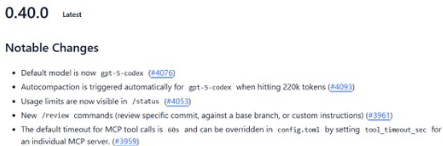
In Codex CLI version 0.40 , OpenAI switched to gpt-5-codex as the default model and introduced several developer-focused improvements: autocompaction is now triggered when the session context reaches 220k tokens ; usage limits/quotas are now visible on the /status page; and a new set of /review commands are available for reviewing specific commits, comparing against a baseline branch, or passing custom review instructions. Additionally, the default timeout for MCP tool calls is set to 60s , which can be adjusted for each MCP service in config.toml.

This update aligns with recent official upgrades to the Codex ecosystem, including improved CLI and IDE/web collaboration, automated code review, and enhanced workflow transparency. Developers can upgrade to 0.40 via npm or Homebrew. Details of the changes and migration instructions can be found in the repository's release notes and developer center.

Frequently Asked Questions

Q: What is the default model for 0.40?

A: gpt-5-codex, it can be used without manual switching.

Q: When is automatic compression triggered?

A: Automatically when the context is close to 220k tokens to control the session size.

Q: What new capabilities does /review add?

A: It supports single commit review, baseline branch-based difference review, and custom review instruction mode.

Q: How do I view quotas and rate limits?

A: Check the current usage limit and consumption in /status of the CLI.

Q: How to adjust the timeout of MCP calls?

A: The default is 60 seconds ; this can be set individually for each MCP server in config.toml.tool_timeout_sec


CodexCLI0.40 default model gpt-5-codex CodexCLI0.40 automatically compresses 220k CodexCLI0.40 session autocompaction CodexCLI0.40/status usage limit CodexCLI0.40/status rate is visible CodexCLI0.40/review form submission for review CodexCLI0.40/review baseline comparison CodexCLI0.40/review custom instructions CodexCLI0.40MCP timeout 60s CodexCLI0.40config.toml timeout configuration CodexCLI0.40 tool call stability CodexCLI 0.40 Workflow Transparency CodexCLI 0.40 Code Review Automation CodexCLI0.40CLI and IDE collaboration CodexCLI0.40Web terminal linkage CodexCLI 0.40 npm Upgrade Guide CodexCLI 0.40 Homebrew installation CodexCLI0.40Release Description CodexCLI 0.40 Migration Guide CodexCLI 0.40 Developer Center CodexCLI0.40 function call enhancement CodexCLI 0.40 long context support CodexCLI0.40220k Threshold Management CodexCLI0.40 session volume control CodexCLI0.40 quotas and limits CodexCLI0.40 real-time status query CodexCLI 0.40 Baseline Branch Review CodexCLI 0.40 Differentiated Code Review CodexCLI0.40 tool timeout by service CodexCLI0.40tool\_timeout\_sec CodexCLI0.40 default model switch CodexCLI0.40gpt-5-codex direct use CodexCLI0.40 multi-round dialogue development Key Points of CodexCLI0.40 Engineering Practice CodexCLI 0.40 team collaboration improvements CodexCLI0.40 end-to-end pipeline CodexCLI 0.40 Version Change Summary CodexCLI0.40 FAQ CodexCLI0.40 rate limit view CodexCLI0.40 quota usage tracking CodexCLI0.40 Local Configuration Example CodexCLI 0.40 Best Practices Collection CodexCLI 0.40 Submission Review Template CodexCLI0.40 custom review strategy CodexCLI 0.40 semantic review capabilities CodexCLI0.40 code quality improvement CodexCLI0.40 development efficiency upgrade CodexCLI0.40 ecological upgrade rhythm CodexCLI 0.40 integrated with MCP CodexCLI0.40 online documentation entry

Recommended Tools

More

