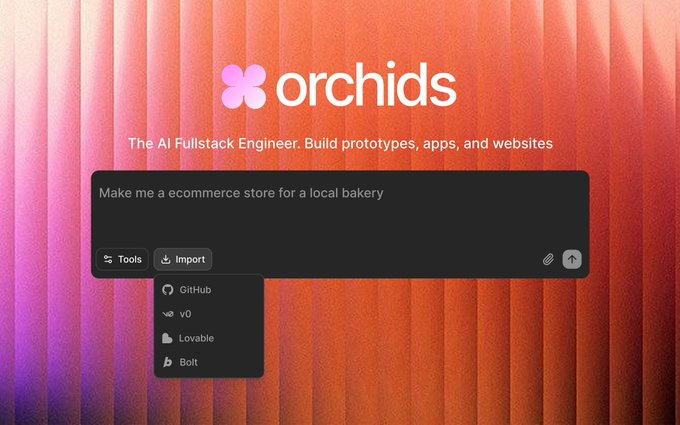
Orchids has officially announced the launch of Import in Orchids : users can import any project from Lovable, Bolt, v0, or GitHub directly into Orchids and continue developing and iterating from a single location. The announcement also emphasizes that to encourage migration and trial, users who import projects will automatically receive 500,000 free credits to be used for running and building projects within the platform. This update, available to all users, aims to reduce migration costs across tools and unify development workflows.
Currently, the official mainly releases information through social channels. There are no detailed terms and conditions regarding the validity period, applicable model scope, or usage limit of the gift points. The import process involves third-party platforms and warehouse permissions. The actual experience is subject to the latest announcements and in-app prompts from Orchids.
Frequently Asked Questions
Q: Which platforms/sources can I import from?
A: We support importing projects from Lovable, Bolt, v0, and GitHub . You can continue developing in Orchids after importing.
Q: Is there always a gift for importing?
A: The official statement is that " all users who import projects will automatically receive 500,000 free points "; the specific validity period and scope of application are not detailed.
Q: What can points be used for?
A: It is used for running, generating and related computing power consumption within Orchids; details are subject to platform billing and model support.
Q: Is there a time window or quota limit?
A: The announcement does not clearly define any restrictions; it is recommended to refer to official subsequent instructions or in-app policy updates.
Q: What should I pay attention to during migration?
A: Check project dependencies and access permissions to ensure that the Git repository connection and key configuration are correct to prevent private information from being misleadingly entered.