1. Basic information
Tabbit Browser is a desktop product positioned as an AI-native browser, emphasizing the introduction of "context" and "automation" in the browsing process. The official website shows that it is in the beta stage, and the copyright information is marked as LUMINALAB PTE. LTD.。 Currently available for macOS and Windows: macOS requires 12 or above with M1 or later; Windows requires Windows 10 or later.
2. Product overview
The core keywords of Tabbit Browser include contextual conversations, task automation, and tab organization. It combines the chat sidebar with browsing behavior, allowing users to use web pages, text, screenshots, files, etc. as contextual materials, and then answer questions based on these contents, organize and output, thereby reducing the cost of switching back and forth between different tools.
3. Core functions
1. Main functions
1. Contextual citations and dialogue
Support adding "text, screenshots, pages, files", etc. to references to form a traceable context collection for answering and organizing the current task.
2. Multi-mode and tool switching
Switch between different modes and tools to suit tasks such as in-depth research, authoring, data processing, or automated processes.
3. Multi-model switching
The official website lists switchable models including GPT-5.2, Gemini-3.1-Pro, Claude-Sonnet-4.6, DeepSeek-V3.2, Doubao-Seed-1.8, Kimi-K2.5, Qwen3.5-Plus, GLM-5, MiniMax-M2.5, etc., and the actual available range may vary depending on the region, version, and service strategy.
4. Tab and group management
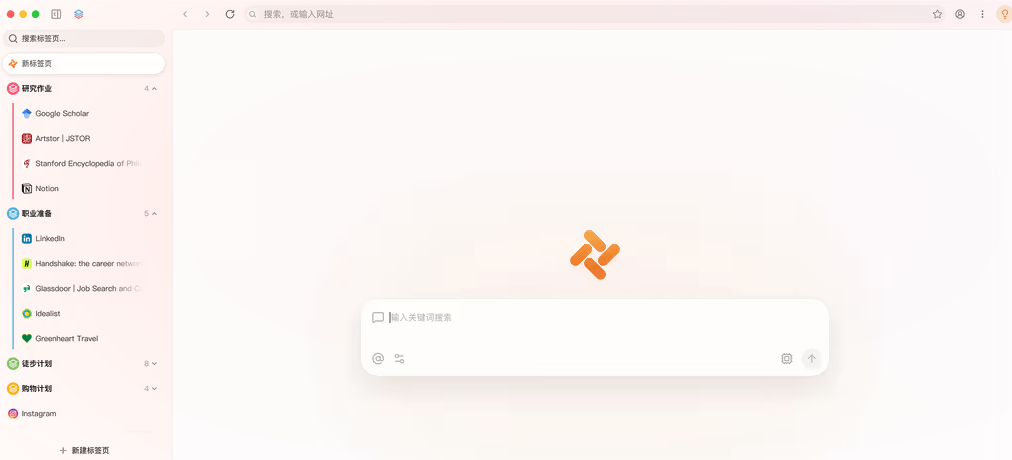
Provide vertical sidebars and one-click grouping to aggregate cluttered pages into groups, making it easy to maintain a structured view in research and writing. It also supports operations such as undoing the grouping results.
5. Skill and scripting capabilities
High-frequency prompts can be precipitated into one-click triggered skills; The version history also includes the ability to generate JS/CSS in natural language and save and reuse it, making it suitable for personalized web interactions and lightweight automation.
6. Split screen and export
Support split-screen browsing; Some versions support saving conversation results as Markdown or PDF, and support functions such as chart rendering and web page translation.
2. Technical characteristics and usage
Tabbit Browser is based on an iteration of the Chromium kernel, and the version history mentions an engine upgrade to 144. It is usually used to start a conversation in the input box or sidebar of the home page, add context by referencing tabs, files, and screenshots, and then use Skill or Agent to perform tasks such as organizing, comparing, extracting, and generating with Skill or Agent.
4. Pricing and versions
The official website does not clearly disclose the complete pricing system on the homepage; Whether it is free for a long time, whether there is a subscription or different packages, it is uncertain. The product is in beta and features may change with version updates.
5. Applicable scenarios and target groups
It is suitable for users who need to read and summarize frequently, such as researchers, product and operations, content creators, data and analytics roles, and people who need to organize multiple pages of data into structured output. It is also suitable for users who want to improve their daily browsing efficiency through tab grouping, split screen and shortcuts.
6. Precautions for use and compliance
If you enable capabilities such as subscription management, it may involve logging in to your email address to identify subscription services and billing information. The specific scope of data processing and retention policies vary by policy and version. The version history mentions the ability to "prevent specific websites from being read by AI" in the privacy and security settings, and it is recommended to enable the relevant controls when working with sensitive pages. The data processing terms of cross-regional model calls, data transmission boundaries, and third-party model service providers are subject to the official privacy and service terms.
7. Frequently asked questions
Q: What operating systems does Tabbit Browser support?
A: The official website shows that it supports macOS and Windows; macOS requires 12+ with M1 or newer, and Windows requires Windows 10 or later.
Q: How does Tabbit Browser's contextual conversation work?
A: You can add web pages, text, screenshots, and files as references to the conversation, and then let the sidebar explain, organize, compare, or generate output based on these materials.
Q: What is the difference between Tabbit Browser's Skill and Agent?
A: Skill is more inclined to solidify common instructions into one-click triggering; Agents are more inclined to perform multi-step tasks and process automation, and some versions support saving frequently used Agent tasks as skills.
Q: How does Tabbit Browser control AI reading website content?
A: The version history mentions that website blocking items can be added to the privacy and security settings to prevent AI from reading the content of these sites.
Q: Does Tabbit Browser provide a version update history?
A: The official website provides a "What's New" page, which lists the release time and new features of the beta version, making it easy to track feature changes.