1. Abstract
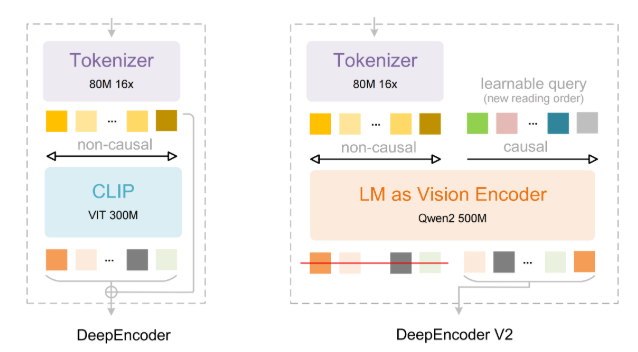
DeepSeek-OCR 2 is an upgrade of DeepSeek's open-source OCR/document understanding model, with the theme of "DeepSeek-OCR 2: Visual Causal Flow", emphasizing a more human-friendly visual coding method and providing stronger structured extraction and understanding capabilities for complex layouts (documents, charts, mixed pages, etc.). The official repository and model card provide two inference paths, Transformers and vLLM, and provide prompt templates such as "convert documents to Markdown", "image OCR", and "target positioning".
2. Core features
- Visual Causal Flow direction: officially described as a more "humanized" visual coding; Some interpretations will summarize this as a visual token organization that is more in line with semantic/typography logic (specific algorithm details are recommended to read the PDF of the paper provided with the repository).
- Dynamic resolution and token budget: Dynamic resolution is supported, and the default configuration example is a combination of multiple blocks of 768×768 + 1 block of 1024×1024, corresponding to a fixed visual token budget (the official example is about 256 tokens), which is convenient for making trade-offs between speed, video memory and accuracy.
- Structured output for documents: The built-in prompt example supports "Convert the document to markdown", which is suitable for converting PDF/image documents into editable text and lightweight structure.
- Positioning and general understanding: The prompt example contains rec (locating a reference object) and a general description, which means that it is not only "word reading", but can also be used for understanding and retrieval in mixed graphics and text scenarios.
3. Installation
- Environment suggestions: The official test environment is CUDA 11.8 + PyTorch 2.6.0, Python 3.12.9.
2. Transformer inference: Load deepseek-ai/DeepSeek-OCR-2 directly from Hugging Face, and recommend enabling FlashAttention (example is flash-attn==2.7.3) with bfloat16 inference.
- vLLM inference: The repository provides vLLM-related instructions and scripts, including image streaming output, PDF concurrent processing, and benchmark batch evaluation scripts. Parameters such as input/output paths need to be modified by configuration file.
4. Typical use cases
- Document to Markdown: Scanned copies, papers, manuals and other pictures/pages, one-click export of Markdown for secondary editing and retrieval.
- Complex Layout OCR: For scenarios where traditional OCR is prone to disorder, such as tables, mixed graphics and text, and flowchart annotations, try to use "with layout/grounding" prompts to obtain a more stable structure.
- Diagram and illustration analysis: Separate analysis of figures in documents, suitable for knowledge base construction and report automation.
- Target positioning and citation: Use positioning prompts to find elements (such as a label, button, or area) in the diagram for document review, data annotation, and automatic quality inspection.
5. Ecology and competing products
- Ecology: Model weights are published on Hugging Face, and the repository provides inference scripts and PDF concurrent processing entrances, which is convenient for access to offline pipelines or service-oriented deployment.
- Competing products/references: Projects such as Vary, GOT-OCR2.0, MinerU, and PaddleOCR appear in the official acknowledgment and benchmarking links, which can be used as comparison objects in the dimensions of "speed, layout restoration, open source controllability, and deployment cost".
- Selection suggestions: If you pay attention to "Document Structured Output (Markdown) + Concurrent Batch Processing (PDF) + Unified Multimodal Prompt", the project entrance of DeepSeek-OCR 2 is closer to the assembly line. If you prefer traditional OCR engines and rule post-processing, ecosystems such as PaddleOCR/MinerU are more mature.
6. Limitations and precautions
- The details of the paper need to be checked: the database provides a PDF of the paper, but the model card/README is more restrained in describing the details of the algorithm. It involves key mechanisms such as "visual causal flow/dynamic organization", and it is recommended to refer to the paper and code implementation.
- Video memory and throughput: Dynamic resolution and visual token budget will directly affect video memory usage and speed, so it is recommended to use small batch verification before concurrency.
- Output quality dependent prompts: For the same document, "Free OCR", "Markdown Conversion with Grounding", and "figure parsing" will get results of different granularity, and it is recommended to solidify the prompt template and evaluation set for the business.
- Complex documents still need to be proofread: for mathematical formulas, extreme typesetting, and low-definition scans, it is still recommended to manually check or introduce a secondary verification process.
7. Project address
https://github.com/deepseek-ai/DeepSeek-OCR-2
8. Frequently asked questions
Q: What are the core keywords of DeepSeek-OCR 2? What exactly does Visual Causal Flow mean?
A: Officially, it is described as a more "human" direction of visual coding; For more specific mechanisms, the repository paper PDF and code implementation shall prevail.
Q: How does DeepSeek-OCR 2 convert image documents to Markdown?
A: Use the prompt example <image>\n<|grounding|>Convert the document to markdown. and call model.infer(...) as the example outputs to the specified directory.
Q: Does DeepSeek-OCR 2 support batch running PDFs?
A: Yes. The repository gives the vLLM a PDF concurrency script entry and prompts to modify parameters such as input/output paths in the configuration file.
Q: What is the open-source license for DeepSeek-OCR 2? Can it be commercialized?
A: The repository and model card are marked as Apache-2.0; It is still recommended to check the license list once based on your distribution method and dependencies.
Q: How does dynamic resolution and visual token budget affect performance?
A: Higher resolution or more chunking is usually more conducive to complex layouts, but it is also more memory-intensive/slower; It is recommended to do a "speed-precision" curve test around your document type before finalizing.