1. Abstract
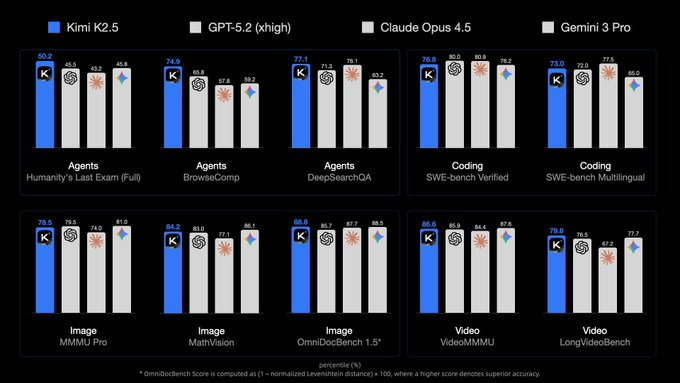
Kimi K2.5 is an open-source "vision + agentic" multimodal model released by Moonshot AI, which supports unified image/video and text input, and provides dialogue mode and agent mode. Focus on vision-driven coding and visual debugging, long-link tool calls, and self-orchestrating parallel multi-agent mechanisms (Agent Swarm, beta). The official materials also disclose a number of benchmark results (different evaluation settings and tool configurations will affect the score, and the official reproduction experimental conditions should prevail when used).
2. Core features
- Native multimodal (image/video/text): for tasks such as visual question answering, video understanding, graphic reasoning, and "reading pictures and writing code/watching videos to restore pages".
- Visual coding and visual debugging: Emphasize front-end generation and animation expression, and generate web pages closer to the "design draft" from chat, picture or video intent, and use visual feedback to self-check in iteration.
- Agentized tool call: multi-step collaboration for tools such as retrieval, browsing, and code interpreter, suitable for information collection, verification, and complex task decomposition.
- Agent Swarm Parallel Orchestration (Beta): The model can dynamically create child agents and execute them in parallel without presetting fixed workflows. The official disclosure limit can reach 100 sub-agents, about 1,500 tool calls, and claims to have a significant acceleration compared to a single agent.
- Benchmark performance (officially announced): including Agentic, visual, and code benchmarks (such as HLE, BrowseComp, MMMU Pro, VideoMMMU, SWE-bench Verified, etc.). Practical results It is recommended to combine your tasks with toolchains for A/B verification.
3. Installation
- Get weights: Download the Kimi K2.5 weights and supporting files from Hugging Face (large size, need to reserve enough disk and bandwidth).
- Local inference: Select inference frameworks such as Transformers according to the model warehouse instructions; Multimodality also often involves dedicated processor/vision preprocessing scripts and custom code dependencies.
- Use through API: If you do not build your own inference, you can directly use the model interface of Moonshot Open Platform (supporting dialogue and tool call forms), which is more convenient for reproducing experimental configurations and online integration.
- Coding scenario support: For "production-level coding workflows", Kimi Code is officially provided as a terminal/IDE side tool form, which can be combined with K2.5.
4. Typical use cases
- Viewing/video generation front-end: Generate page structure, styles, and animations from screenshots, screen recordings, or design references, and iterate over multiple rounds of dialogue.
- Visual debugging and regression: Compare the rendering results with the reference drawing, and locate the layout deviation, dynamic inconsistency, component state errors and other problems.
- Information collection agent: Combine search and browsing tools to complete data collection, cross-verification, and output structured reports.
- Long-link office automation: generation and modification of documents/tables/PDFs (need to run in a controlled permission and tool environment).
- Multi-agent parallel task: Split "research + code + test + documentation" into parallel subtasks to improve throughput and delivery speed.
5. Ecology and competing products
- Ecosystem: Provide online products (chat/agent), open platform API, and open source weights; And supporting coding products and tooling entrances.
- Comparison ideas of competing products:
- Visual multimodality: Compared with mainstream multimodal large models, focus on the input form (picture/long video), visual reasoning stability, and "vision-to-code" restoration you care about.
- Agent framework: Compared with single-agent tool calls, Agent Swarm is more "parallel orchestration" and is suitable for complex tasks that can be split. Non-parallel serial dependent tasks may have limited benefits.
- Project implementation: If you prioritize controllability and self-deployment, open source weight is more advantageous; If you prioritize stability and managed experience, API solutions are less expensive to maintain.
6. Limitations and precautions
- Resource consumption: open source rights are large and deployment costs are high (video memory, disk, bandwidth, and inference throughput all need to be evaluated).
- Evaluate reproducibility: Different tools, prompts, context management, and temperature parameters can significantly affect the Agentic benchmark score, so it is recommended to verify it according to the official reproducibility instructions.
- Multi-agent risk: Parallel subtasks will bring consistency and merge costs, and the increase in the number of tool calls will also increase the probability of failure. Stricter logging, retries, and privilege controls are required.
- "Aesthetic" deviation from vision to code: The animation and style of the generated page may not meet the team's specifications, and code review and design acceptance are still required.
7. Project address
https://huggingface.co/moonshotai/Kimi-K2.5/tree/main
8. Frequently asked questions
Q: Is Kimi K2.5 really "open source and commercially available"?
A: The license declared by the warehouse shall prevail; Also pay attention to third-party notices and the specific license terms of the weight/code.
Q: What tasks is the Kimi K2.5 Agent Swarm suitable for?
A: Suitable for complex workflows that can be split (research, implementation, testing, documentation in parallel); Acceleration of strong serial dependency tasks may be limited.
Q: How does Kimi K2.5 call (dialog/agent) via Moonshot API?
A: Go to the model interface of Moonshot Open Platform; Select a conversation mode or an agent form with tool calls per document.
Q: What is the minimum hardware recommendation for on-premises Kimi K2.5?
A: Depends on precision, concurrency and context length; Due to the large weight size, it is recommended to evaluate the video memory and disk capacity first, and use a small-scale test run to verify throughput and cost.
Q: How does visual encoding (image/video to web) improve consistency?
A: It is recommended to provide clear references (design drafts/screen recording keyframes), clarify component specifications and constraints (layout grid, font, color, animation rules), and introduce screenshot comparisons that can be automatically regressed.