Back to AI is open source
A new choice for open source image generation: GLM-Image's architecture, capabilities, and implementation scenarios

A new choice for open source image generation: GLM-Image's architecture, capabilities, and implementation scenarios

AI is open source Admin 84 views

1. Abstract

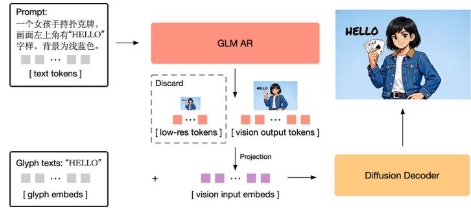
GLM-Image is an open-source image generation model from Z.ai, using a hybrid paradigm of "discrete autoregressive generation + diffusion decoding": the autoregressive module is responsible for global semantics and layout planning, and the diffusion decoder is supplemented with high-fidelity details. Official information points out that its overall image quality can align with the mainstream diffusion route, and at the same time, it performs more prominently in text rendering and knowledge-intensive images (posters, PPTs, popular science diagrams).

2. Core features

  1. Hybrid architecture: take into account instruction understanding (global) and detail restoration (local).
  2. More stable text: more suitable for multi-line text, heading/subheading hierarchy and information card layout.
  3. Knowledge-intensive generation: Pictures for "information expression first", such as flowchart posters and annotation diagrams.
  4. Wensheng Diagram + Tushengtu: Support generating, editing, and style/consistency-related tasks (subject to official examples).

3. Installation

  1. Get code and weight: GitHub clone repository; Download the model weights from Hugging Face.
  2. Python inference: Install dependencies such as Transformers/Diffusers according to the repository instructions, load the pipeline for generation.
  3. Interface call: You can directly use the images/generations endpoint of the Z.ai API to pass in parameters such as prompt and size.

4. Typical use cases

  1. Posters and event materials: Promotional graphics with "clear and readable text + stable layout" are required.
  2. PPT information page: chapter covers, key points, comparison charts and other information-dense screens.
  3. Popular science diagram and annotation diagram: emphasize semantic correctness and information structure, rather than pure stylized art.
  4. Brand consistency output: Multiple images keep the style consistent with the main body and reduce rework.

5. Ecology and competing products

  1. Ecology: Hugging Face provides models and instructions; Official documentation provides APIs and parameters; GitHub provides native inference and examples.
  2. Competing products: Compared with mainstream routes such as SDXL/SD3 and FLUX, GLM-Image is more inclined to the "text + knowledge expression" scenario; Universal style coverage and cost recommendations use your prompts to compare and evaluate the data.

6. Limitations and precautions

  1. Computing power threshold: Hybrid architecture and high-resolution generation may require higher video memory/multi-card support.
  2. Dimensional constraints: It is common to require the width and height to be a specific multiple (such as a multiple of 32), otherwise an error may be reported.
  3. Text still needs to be accepted: manual review is recommended for small font sizes, complex fonts, and multilingual mixed layout scenarios.

7. Project address

https://github.com/zai-org/GLM-Image

8. Frequently asked questions

Q: What are the benefits of GLM-Image's "autoregression + diffusion decoding" hybrid architecture?

A: Self-regression is better at global semantics and layout planning, diffusion is better at detail and texture completion, and it is more conducive to information-dense image generation after combination.

Q: Why is GLM-Image more advantageous in rendering images in Chinese?

A: The official materials emphasize that it has been specially designed and trained for text and information expression, making the generated text clearer and closer to the expected layout.

Q: What knowledge-intensive scenarios is GLM-Image suitable for?

A: Posters, PPT information pages, popular science diagrams, pictures with multi-region annotation and hierarchical information.

Q: Can GLM-Image do image generation/editing?

A: Yes, the repository and model pages provide relevant usage and example parameters (subject to the official one).

Q: What should I do if GLM-Image can't run locally?

A: Reduce the resolution and number of steps first, use larger memory/multiple cards if necessary, or use the Z.ai API instead.

Q: Why does the GLM-Image generated size error?

A: The common reason is that the width and height do not meet the multiple constraints required by the model; Adjust to compliant dimensions according to the document.

GLM-Image Open Source Release: Z.ai Hybrid Architecture Focuses on High-Fidelity Detail GLM-Image uses autoregression + diffusion decoding: why Z.ai bet on a hybrid paradigm GLM-Image benchmarks SDXL/SD3: Z.ai emphasizes more stable text rendering GLM-Image Text Rendering Advantages Exposed: Z.ai Aim for Posters and PPT Infographics GLM-Image is stronger for knowledge-dense graphs: Z.ai put information expression first GLM-Image supports Wensheng Diagram + Tushengtu: Z.ai open generation and editing capabilities GLM-Image Installation Guide: How to Run the GitHub Clone + Hugging Face Weight GLM-Image Local Inference Threshold: Why Z.ai Hybrid Architecture Eats Memory More GLM-Image size error reason: Why does the Z.ai model require a 32-fold constraint? GLM-Image for poster materials: Z.ai how to achieve a stable layout and clear text GLM-Image is used for PPT information pages: Z.ai how the model generates bullet point cards GLM-Image science popularization is more accurate: Z.ai focuses on semantic correctness and structural expression GLM-Image Brand Consistency Output: How Z.ai Reduce Multi-Image Rework GLM-Image Ecosystem Panorama: GitHub Samples + Official API + Hugging Face Model Page GLM-Image API is launched: How to use the Z.ai images/generations endpoint GLM-Image hybrid architecture benefits: autoregressive tube layout diffusion supplement details Why GLM-Image is better for multi-line text: Z.ai training direction revealed GLM-Image vs. FLUX: Z.ai is more biased towards text and knowledge expression scenarios GLM-Image vs. SDXL: Z.ai reason not to take the pure diffusion route GLM-Image is suitable for information card layout: Z.ai make header subheadings more readable GLM-Image still needs to be accepted for complex fonts: Z.ai reminder text is not 100% reliable GLM-Image image editing capabilities: Z.ai official examples reveal what to play GLM-Image High-Resolution Generation Challenge: Computing power pressure brought about by Z.ai hybrid decoding How to evaluate GLM-Image prompts: Z.ai recommend comparing the test with SD3 GLM-Image Download and Deployment: The entire process from Hugging Face to local pipeline GLM-Image Transformers/Diffusers dependencies: Z.ai which libraries to install for local inference GLM-Image Applicable Scenario Inventory: Poster PPT Science Popularization Annotation All in One GLM-Image Information Presentation First: Why Z.ai Readability as a Selling Point GLM-Image layout planning is stronger: how the autoregressive module determines the structure of the picture GLM-Image details are more stable: how diffusion decoders improve clarity GLM-Image Generates Promotional Images: Z.ai how to solve the problem of text paste and running boards GLM-Image Generates Flow Chart Posters: Z.ai focuses on knowledge-intensive and hierarchical information GLM-Image makes comparison charts more hassle-free: Z.ai makes the information blocks more organized GLM-Image has a consistent style for multiple images: Z.ai supports consistency-related tasks GLM-Image open-source project address exposed: What are the examples of Z.ai GitHub repositories? GLM-Image FAQ Summary: How Z.ai official explains hybrid architecture What should I do if GLM-Image can't run locally: Z.ai gives a solution to reduce resolution and use API How to choose the size of GLM-Image: Z.ai multiple constraint pit avoidance guide GLM-Image text is clearer: Z.ai specifically designed what improvements the training brings GLM-Image for moving materials: why Z.ai is more practical than generic style GLM-Image is suitable for popular science annotation images: Z.ai emphasizes that semantic correctness is not only good-looking GLM-Image Competitive Product Evaluation Ideas: Z.ai it is recommended to use prompt words to compare the cost with the data How is GLM-Image universal style coverage: Z.ai admit that it needs to be measured and not blindly trusted GLM-Image Editing and Consistency Task: Z.ai image generation capability value is not worth using GLM-Image for designers: Z.ai make "text readable" a highlight GLM-Image's operational value: Z.ai quickly generate posters and information pages GLM-Image is a path for developers: choose between Z.ai local inference and API GLM-Image Limitations: Z.ai acknowledges that small font sizes in multiple languages still need to be reviewed

Recommended Tools

More