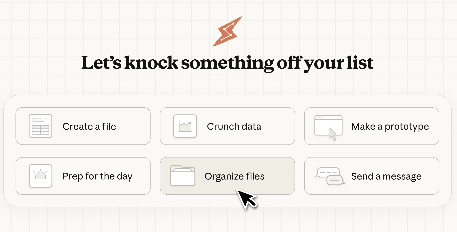
Anthropic launched a preview of the "Cowork" study on Claude Desktop, positioning it as "an extension of Claude Code in more everyday work scenarios". Users can authorize Claude to read, edit, or create files within a designated folder on their computer, which can be used for non-programmatic tasks such as organizing and downloading files, extracting data from ticket screenshots to generate forms, and compiling scattered notes into draft reports.
At present, Cowork is mainly provided through the macOS version of Claude Desktop, open to Claude Max subscribers, and the official emphasizes that when executing tasks, a plan will be made first and user confirmation will be consulted before key operations. At the same time, it also supports connection with some external services, which is convenient for transferring information flow to commonly used work platforms.
Due to the local file access and stronger automation capabilities, special attention should be paid to privacy and data security when using it, avoiding putting sensitive information into the authorized directory, and gradually confirming operations such as "batch renaming, moving, and deleting"; The industry also reminds that it is necessary to guard against common risks of proxy tools such as prompt injection.
FAQs
Q: What are the core functions of Cowork products?
A: Cowork allows Claude to read and write files in the designated folder authorized by the user, and automatically complete office tasks such as organizing, summarizing, and generating documents and forms.
Q: What company and product is Cowork launched by?
A: Cowork is launched by Anthropic and is integrated into the Claude Desktop app and is available as a research preview.
Q: What platforms and subscription conditions does Cowork currently support?
A: Cowork is currently primarily available on macOS and is prioritarily available to Claude Max subscribers, with other users needing to wait in line.
Q: What are some common scenario tasks that Cowork can do?
A: Cowork can organize the "Downloads" folder, extract screenshots/ticket information into tables, generate the first draft of the report from scattered notes, and create or modify relevant files in the folder.
Q: What are the most common risks when using Cowork?
A: The biggest risk is putting sensitive files into the authorization directory or triggering accidental movement/deletion when the instructions are unclear, so the scope of authorization should be limited and carefully confirmed at key steps.