Back to AI hardware
What is Razer Project AVA: 3D Holographic AI Desktop Buddy Concept Analysis

What is Razer Project AVA: 3D Holographic AI Desktop Buddy Concept Analysis

AI hardware Admin 97 views

1. Product positioning

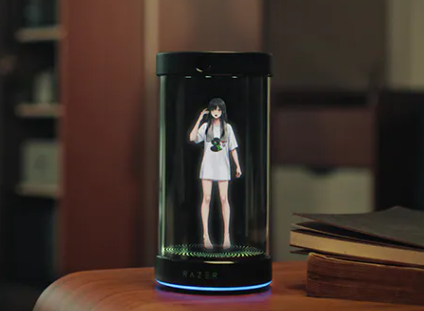
Project AVA is the conceptual AI desktop companion in the Razer showcase. It focuses on "companionship" and "desktop scenes", using a small device to make conversations, reminders, and game guidance into more present interactions, rather than simple voice assistants.

2. Core highlights

It uses a 5.5-inch 3D holographic display to present interchangeable avatars, emphasizing expressions and eye feedback, making communication more like interacting with a character. The hardware side integrates a far-field microphone array, camera, and ambient light sensor, along with speakers and customizable lighting, and Chroma RGB for improved pickup, visibility of you and the environment, and consistency of the desktop atmosphere.

3. Usage mode and boundary

Designed to be used with a USB-C wired connection to a Windows PC, AV A relies on high bandwidth for quick analysis of the contents of your computer's screen, allowing you to make more contextual recommendations while you're working or gaming. The current demo uses Grok as the reasoning and personality engine, while emphasizing open architecture and future compatibility with other AI platforms. In terms of positioning, it is more like a coach and assistant, not an automatic substitute tool. As a concept product, the function and listing form may still be adjusted; The official delivery estimate is for the second half of 2026.

4. Q&A

Q&A Frequently Asked Questions

Q1: Is it an AI device that operates independently?

A: No, the design requires USB-C to connect to a Windows computer, and many capabilities rely on the data and computing power of the computer side.

Q2: What is its biggest practical point?

A: When you are staring at the screen to work or play games, you can combine the screen content to make more specific reminders, organize and guide, and "understand what you are doing" better than the voice assistant that only listens to instructions.

Q3: Is being a game coach considered cheating?

A: The official emphasizes that it is oriented towards training and guidance, rather than automatic operation; Whether it can actually be used in a specific game depends on the rules of the game and how it is implemented.

Project AVA is positioned by Razer as a conceptual desktop AI partner Project AVA focuses on companionship and desktop scene interaction experience Project AVA uses small devices to implement dialogue reminders and game guidance Project AVA makes desktop AI not just voice, but also presence Project AVA uses 5.5-inch 3D holographic avatar interaction Project AVA enhances character interaction with facial gaze feedback Project AVA supports replaceable avatars to create personalized desktops Project AVA integrates a far-field microphone array to improve sound pickup Project AVA has a built-in camera to sense the user and the environment Project AVA adds an ambient light sensor to adapt to desktop light Project AVA is equipped with speakers for more natural dialogue feedback Project AVA supports Chroma RGB lighting effects to unify the desktop atmosphere Project AVA enhances companionship and cue with customizable lighting effects Project AVA is connected to a Windows computer via USB-C for use Project AVA relies on high bandwidth for fast screen content analysis Project AVA can give specific recommendations based on the on-screen context Project AVA brings work scene reminders closer to task progress Project AVA makes game scene guidance more suitable for real-time images Project AVA currently demonstrates Grok as the inference engine Project AVA uses Grok to build personalities and strengthen the dialogue style Project AVA emphasizes open architecture that is compatible with other AI platforms Project AVA can replace the AI platform to achieve different capabilities in the future Project AVA is more like a coach and assistant than an automated substitute tool Project AVA is clearly not a plug-in for players to operate automatically Project AVA concept product form and function are subject to change Project AVA is officially expected to ship in the second half of 2026 Whether Project AVA runs independently depends on computer collaboration Project AVA requires computer data and computing power to be able to exert its capabilities The greatest value of Project AVA is understanding what you are looking at and what you are doing Project AVA organizes on-screen information into reminders and bullet points Project AVA provides more specific task guidance on the job Project AVA provides training strategy suggestions in games Project AVA game coaching positioning emphasizes training rather than cheating Whether Project AVA can be used for specific games depends on the rules Project AVA enhances desktop interactive immersion with 3D holographic displays Project AVA allows users to talk to characters rather than machines Project AVA uses eye feedback to make communication more like a real person Project AVA uses multiple sensors to implement more environmentally aware cues Project AVA combines desktop ambiance with AI interaction Project AVA presents voice dialogue with visual prompts at the same time Project AVA is suitable for people who need companionship and focused management Project AVA is for gamers and creators who want screen-level assistance Project AVA differs from traditional voice assistants in screen understanding Project AVA trades wired connections for lower latency and stability Project AVA provides enhanced contextual capabilities based on on-screen analytics The Project AVA open platform route may lead to greater scalability Project AVA concept desktop partner may become Razer's new interactive direction Project AVA makes reminders and guidance visible and chatable partners Project AVA uses desktop hardware to pull AI from the background to the front of the eyes

Recommended Tools

More