1. Abstract
ml-sharp is Apple's open-source implementation of the SHARP project code and model, with the goal of directly returning to 3D Gaussian (3DGS) scene representations from a single image and achieving "less than 1 second" inference generation on standard GPUs. The resulting 3DGS can be rendered in real-time for high-resolution new perspective synthesis from nearby perspectives, with an emphasis on "metric" and absolute scale, enabling navigation and rendering that is more in line with real camera movement.
2. Core features
- Single image → 3DGS: Input a single photo and output 3D Gaussian splats (.ply) as a scene representation, which is convenient for accessing various 3DGS rendering/viewing tools.
- Second-level generation: Uses a single forward network regression 3D Gaussian parameter, focusing on low latency and interactive experience.
- Measurable scale: The output represents the measurement attributes with absolute scale and camera movement, which is more conducive to camera trajectory rendering and AR/VR preview with a "real sense of distance".
- Zero-shot generalization: Positioned as a robust generalization scheme across datasets, suitable for quickly converting "any photo" into a browsable 3D expression.
5. Engineering CLI: Provides sharp command-line tools to support batch prediction, specify checkpoints, and render trajectories of generated Gaussians (with hardware limitations).
3. Installation
1. Create environment (example): conda create -n sharp python=3.13, then conda activate sharp.
2. Install dependencies: Execute the pip install -r requirements.txt in the root directory of the repository.
3. Verify the installation: Run sharp --help to confirm that the command is available.
4. The default model weights will be automatically downloaded and cached locally for the first run (you can also manually download them according to the link provided in the README and specify them with -c).
4. Typical use cases
- Rapid "drafting" of 3D content: Quickly convert a single footage photo into 3DGS for proof-of-concept, lens rehearsal, and interactive display.
- AR/VR scene preview: Convert photos into navigable scenes, do close-up perspective movement and immersive viewing.
- 3D asset pipeline front: Transform the 2D reference map into a renderable close-up 3D representation to provide the initial form for subsequent reconstruction/editing.
- Research and evaluation: Compare the performance of different new perspective synthesis methods in terms of speed, detail and stability, and reproduce the experimental conclusions.
5. Ecology and competing products
1. Ecological connection: The .ply output of SHARP is compatible with common 3DGS renderers; It should be noted that it uses OpenCV coordinate conventions (x to the right, y down, z forward), and may require scaling/rotation/center of gravity adjustment in third-party renderers.
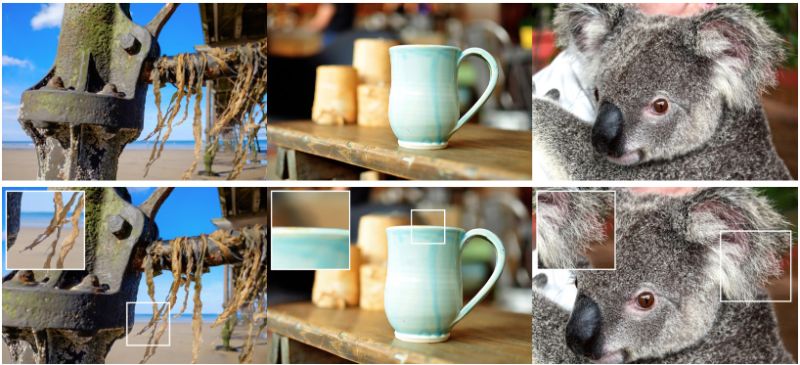
- Comparison direction: The project page gives a visual video comparison with a variety of related methods (such as Gen3C, ViewCrafter, TMPI, Flash3D, LVSM, SVC, etc.). Three things are usually focused on when selecting a model: generation speed (seconds), detail sharpness (whether the structure is stable), and geometric consistency during camera movement.
6. Limitations and precautions
1. Hardware limitations of rendering tracks: Predictions for generating 3DGS can run in environments such as CPU/CUDA/MPS, but rendering video tracks through --render currently requires CUDA GPUs.
- Inherent limitations of a single image: For strong reflections, transparent objects, repetitive textures, and occluded scenes, geometry and textures may drift or artifacts, so it is recommended to manually filter the inputs and results.
- Third-party rendering compatibility details: Different viewers have different conventions on coordinate systems, unit scales, and color/attribute fields, so check the coordinates and scale transformations first when importing exceptions.
- Licensing and commercial use: The code and model weights may adopt different license terms; Be sure to read through the warehouse LICENSE and LICENSE_MODEL before productizing/commercial use.
7. Project address
https://github.com/apple/ml-sharp
8. Frequently asked questions
Q: What is the format of the 3DGS file output by ml-sharp (SHARP) and how to use it?
A: The default output is a .ply file of 3D Gaussian splats, which can be imported into common 3DGS rendering/viewing tools for interactive browsing or rendering.
Q: Will the model weights of ml-sharp be automatically downloaded, and where is the cache?
A: The first run of the prediction will automatically download the default checkpoint and cache it to the Torch checkpoint cache path in the local user directory; It can also be downloaded manually and specified with -c.
Q: Why do I get an error or fail to render a video with sharp predict --render?
A: Track video rendering currently relies on CUDA GPUs; If your environment doesn't have a CUDA toolchain or doesn't meet dependencies, it's recommended to build just .ply and use other renderers to complete the visualization.
Q: Can ml-sharp run on Mac (MPS)?
A: Prediction (generating 3DGS) can usually run on supported device backends, but trajectory rendering is still premised on CUDA; On Mac, it can be .ply and rendered with external tools.
Q: Is SHARP suitable for free roaming in "long-distance scenes"?
A: It is more suitable for "near perspective" new perspective synthesis and short-range camera movement; Large displacements, strong occlusion, and extreme changes in viewing angles can lead to quality degradation.