Back to AI information
MiniMax M2.1 launches MiniMax Agent: Lightning mode is enabled by default, enhancing multilingual programming and toolchain execution

MiniMax M2.1 launches MiniMax Agent: Lightning mode is enabled by default, enhancing multilingual programming and toolchain execution

AI information Admin 272 views

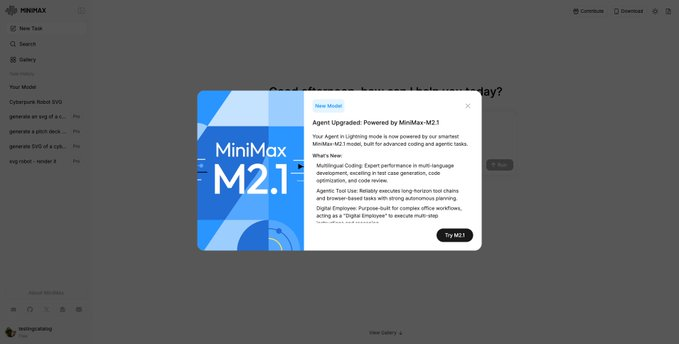
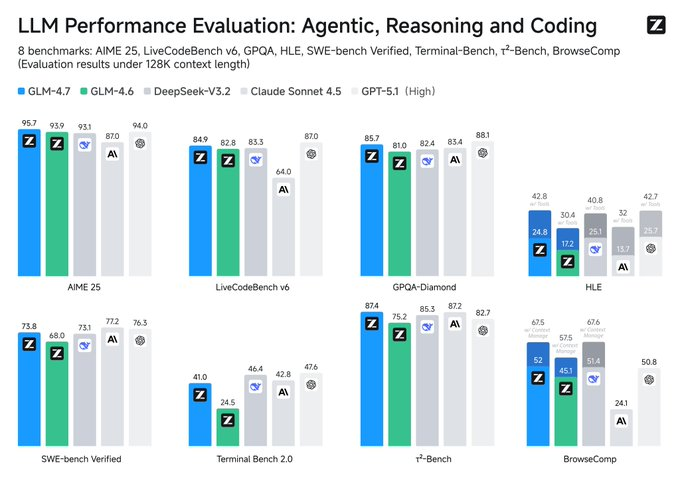
MiniMax announced that its next-generation model, MiniMax M2.1, is available on the MiniMax Agent side and is used as the default driver for "Lightning mode". According to the introduction of official and cooperation channels, M2.1 focuses on strengthening multilingual software development and more reliable task planning and execution capabilities while maintaining response speed, and can more stably complete the whole process from dismantling requirements to output deliverables for complex instructions.

At the functional level, M2.1 is emphasized in three categories: first, the improvement of multilingual programming capabilities, covering engineering links such as test case generation, code optimization and code review; second, it has a stronger ability to use agent-type tools, which can connect multi-step toolchains and handle browser-like tasks over a long period of time; The third is the positioning of "digital employees" for office processes, which is suitable for multi-step workflows across documents, forms, web pages and communication and collaboration. The actual experience may still be affected by account permissions, regional opening pace, and platform usage policies.

FAQs

Q: What scenarios is MiniMax M2.1 mainly used in MiniMax Agent?

A: It is mainly aimed at programming research and development and complex task execution, including multilingual development, browser tasks and multi-step office processes.

Q: What is the relationship between MiniMax Agent's Lightning mode and M2.1?

A: The platform page shows that Lightning mode is driven by MiniMax M2.1 as the default for faster completion of general and productivity tasks.

Q: Which programming skills are the key directions of M2.1?

A: Test case generation, code optimization, code review, and engineering rewriting and fixing across multiple languages.

Q: What exactly can the so-called "digital employees" do?

A: Decompose tasks, call tools, organize materials, and output directly usable documents or results under clear instructions, but you still need to manually review key content and permission operations.

MiniMax M2.1 is the default for Lightning on the Agent side MiniMax M2.1 is the default driver for Lightning mode MiniMax M2.1 enhances multilingual software development capabilities MiniMax M2.1 improves test case generation and review MiniMax M2.1 focuses on code optimization and refactoring and rewriting MiniMax M2.1 reinforcement task planning and stable execution MiniMax M2.1 delivers more reliably for complex instructions MiniMax M2.1 enhances agent-style tool call links MiniMax M2.1 supports long-span multi-step tool tandem MiniMax M2.1 enhances browser-like task processing capabilities MiniMax M2.1 is positioned as the office digital employee engine MiniMax M2.1 is compatible with web processes across document forms The MiniMax M2.1 is used for collaborative communication and material organization MiniMax M2.1 takes into account both speed and inference planning capabilities MiniMax M2.1 improves command compliance and reduces deviation MiniMax M2.1 covers multilingual engineering task scenarios MiniMax M2.1 is used for code review checklisting output MiniMax M2.1 is used for vulnerability remediation and suggestion generation MiniMax M2.1 is used for cross-language migration and adaptation MiniMax M2.1 is used to generate test and regression scripts MiniMax M2.1 is used for browser automation and information organization MiniMax M2.1 is used for multi-step office automation delivery The MiniMax M2.1 breaks down requirements into actionable plans MiniMax M2.1 is more stable and closed-loop from planning to output What tasks is MiniMax Agent Lightning mode suitable for? MiniMax Agent runs through productivity processes with M2.1 The actual experience of MiniMax M2.1 is affected by the permission region MiniMax M2.1 Open Rhythm and Usage Policy Tips MiniMax M2.1 is suitable for R&D teams to improve efficiency MiniMax M2.1 is suitable for operational and assistant workflows MiniMax M2.1 is suitable for task orchestration across toolchains The MiniMax M2.1 is suitable for long-task tools The MiniMax M2.1 turns piecemeal work into a standard process MiniMax M2.1 makes the digital workforce more controllable and reliable MiniMax M2.1 emphasizes that the output still needs to be manually reviewed How to trigger the use of MiniMax M2.1 in the Agent Interpretation of MiniMax M2.1 compared to the old version How to do engineering code rewriting in MiniMax M2.1 How MiniMax M2.1 does a multilingual project review How to do automatic organization of office materials with MiniMax M2.1 MiniMax M2.1 summarizes the value of enterprise collaboration MiniMax M2.1 improves stability for complex tasks MiniMax M2.1 makes Lightning mode faster and more stable MiniMax M2.1 for Risk and Boundaries for Tool Calls MiniMax M2.1 adapts to document-to-form deliverables MiniMax M2.1 is oriented towards the execution of browser tasks MiniMax M2.1 Digital Employee Scenario Implementation Guide Inventory of the application of MiniMax M2.1 in MiniMax Agent

Recommended Tools

More

